<?xml version="1.0" encoding="utf-8"?><feed xmlns="http://www.w3.org/2005/Atom" ><generator uri="https://jekyllrb.com/" version="4.4.1">Jekyll</generator><link href="https://mehmandarov.com/feed.xml" rel="self" type="application/atom+xml" /><link href="https://mehmandarov.com/" rel="alternate" type="text/html" /><updated>2026-04-19T20:48:26+02:00</updated><id>https://mehmandarov.com/feed.xml</id><title type="html">Rustam Mehmandarov</title><subtitle>A blog about technology and related stuff</subtitle><author><name>Rustam Mehmandarov</name></author><entry><title type="html">API versioning in Java using JAX-RS with Jakarta EE and MicroProfile</title><link href="https://mehmandarov.com/api-versioning/" rel="alternate" type="text/html" title="API versioning in Java using JAX-RS with Jakarta EE and MicroProfile" /><published>2026-04-19T09:50:00+02:00</published><updated>2026-04-19T09:50:00+02:00</updated><id>https://mehmandarov.com/api-versioning</id><content type="html" xml:base="https://mehmandarov.com/api-versioning/"><![CDATA[<p><em>Creating APIs and maintaining them over time means often that we need to version them. We will be looking into several ways of doing so in Java using JAX-RS, while building our API end-points using Jakarta EE and MicroProfile. This post was inspired by my talk “API = Some REST and HTTP, right? RIGHT?!”</em></p>

<ul>
  <li><a href="#introduction">Introduction</a></li>
  <li><a href="#why-versioning">Why Versioning?</a></li>
  <li><a href="#show-me-the-code">Show Me The CODE!</a></li>
  <li><a href="#1-url-versioning">1. URL Versioning</a></li>
  <li><a href="#2-header-versioning">2. Header Versioning</a></li>
  <li><a href="#3-media-type-versioning-content-negotiation">3. Media Type Versioning</a></li>
  <li><a href="#4-request-parameter-versioning">4. Request Parameter Versioning</a></li>
  <li><a href="#5-bonus-combining-strategies---transparent-uri-rewriting-enterprise-pattern">5. Bonus: Combining Strategies</a></li>
  <li><a href="#6-end-point-deprecation">6. End-Point Deprecation</a></li>
  <li><a href="#summary-comparison">Summary Comparison</a></li>
  <li><a href="#conclusion">Conclusion</a></li>
  <li><a href="#whats-next">What’s Next?</a></li>
</ul>

<hr />

<h2 id="introduction">Introduction</h2>

<p>When working with APIs over time we would often need to make some changes to end-point definitions – like adding or deleting resources or changing the attributes for a resource. To ensure backwards compatibility, we often have to introduce <em>versioning</em> for our APIs. APIs, like all software, evolve. You might be adding optional fields or introducing a breaking change. At some point, you will need versioning to support coexistence of the old and new consumers.</p>

<p>However, versioning the API endpoint introduces a question of how this should be done. In this post, we’ll explore <strong>several common API versioning strategies</strong>, using Jakarta EE and Java.</p>

<blockquote>
  <p>💡 Note: There is no silver bullet – instead, we’ll explore <strong>pros, cons, and real-world fit</strong>.</p>
</blockquote>

<h2 id="why-versioning">Why Versioning?</h2>

<p>Why not just change the API?<br />
Because breaking contracts is dangerous — clients may not update in sync, and you’ll break production consumers.</p>

<p>Versioning allows you to:</p>
<ul>
  <li>Support legacy clients</li>
  <li>Introduce new features safely</li>
  <li>Deprecate responsibly</li>
</ul>

<blockquote>
  <p>⚠️ <strong>Caution</strong>: Versioning can cause “version explosion.” Each version increases long-term maintenance cost – aka <em>technical debt</em>.</p>
</blockquote>

<p><strong>Best Practice</strong>: Prefer <em>backward-compatible changes</em> (e.g., adding fields) whenever possible. To mitigate risks, it’s important to follow best practices for versioning and provide clear documentation and migration paths for users. Also, remember to <em>deprecate</em> old versions to minimize maintenance efforts.</p>

<h2 id="show-me-the-code">Show me the CODE!</h2>

<p>I have created a repository called <a href="https://github.com/mehmandarov/randomstrings/">Random Strings</a> to showcase various concepts. For this blogpost, I would recommend having a look at <a href="https://github.com/mehmandarov/randomstrings/blob/master/src/main/java/com/mehmandarov/randomstrings/apidemo/RandomStringsAPIDemoController.java"><code class="language-plaintext highlighter-rouge">RandomStringsAPIDemoController.java</code></a> and <a href="https://github.com/mehmandarov/randomstrings/blob/master/request_examples.http"><code class="language-plaintext highlighter-rouge">request_examples.http</code></a>. You will find all the info on building and running the code in the repo’s <code class="language-plaintext highlighter-rouge">README.md</code> file. Each section below will contain “How to call it” part with an example using <code class="language-plaintext highlighter-rouge">curl</code> or HTTP-files, and will be based on this repo.</p>

<hr />

<h2 id="1-url-versioning">1. URL Versioning</h2>

<h3 id="what-it-looks-like">What it looks like</h3>
<p>A version appears directly in the URI path. If your API is at <code class="language-plaintext highlighter-rouge">https://example.com/api</code>, and the current version is version 1, the URL for a resource might look like this: <code class="language-plaintext highlighter-rouge">https://example.com/api/v1/resource</code>:</p>

<div class="language-java highlighter-rouge"><div class="highlight"><pre class="highlight"><code><span class="nd">@GET</span>
<span class="nd">@Path</span><span class="o">(</span><span class="s">"/v2/"</span><span class="o">)</span>
<span class="nd">@Produces</span><span class="o">(</span><span class="nc">MediaType</span><span class="o">.</span><span class="na">APPLICATION_JSON</span><span class="o">)</span>
<span class="kd">public</span> <span class="nc">Response</span> <span class="nf">getV2</span><span class="o">()</span> <span class="o">{</span>
    <span class="k">return</span> <span class="nc">Response</span><span class="o">.</span><span class="na">status</span><span class="o">(</span><span class="nc">Response</span><span class="o">.</span><span class="na">Status</span><span class="o">.</span><span class="na">NOT_IMPLEMENTED</span><span class="o">)</span>
        <span class="o">.</span><span class="na">entity</span><span class="o">(</span><span class="s">"This v2 using *path versioning* of the API is not implemented."</span><span class="o">)</span>
        <span class="o">.</span><span class="na">build</span><span class="o">();</span>
<span class="o">}</span>
</code></pre></div></div>

<h3 id="how-to-call-it">How to call it</h3>

<p><strong>cURL:</strong></p>
<div class="language-bash highlighter-rouge"><div class="highlight"><pre class="highlight"><code>curl <span class="nt">-X</span> GET http://localhost:8080/api/rnd/v2/ <span class="se">\</span>
  <span class="nt">-H</span> <span class="s2">"Accept: application/json"</span>
</code></pre></div></div>

<p><strong>HTTP Request (<code class="language-plaintext highlighter-rouge">.http</code> file):</strong></p>
<div class="language-http highlighter-rouge"><div class="highlight"><pre class="highlight"><code><span class="err">GET http://localhost:8080/api/rnd/v2/
Accept: application/json
</span></code></pre></div></div>

<p><strong>✅ Pros:</strong></p>
<ul>
  <li>Simple and intuitive. Visible.</li>
  <li>Easy to test (e.g., with curl or Postman directly in a browser).</li>
  <li>Plays well with gateways and reverse proxies.</li>
  <li>Clear visual distinction between versions.</li>
</ul>

<p><strong>❌ Cons:</strong></p>
<ul>
  <li>Pollutes the URI with versioning logic.</li>
  <li>Breaks REST’s principle of stable resource identifiers.</li>
  <li>Clients have to update URLs when migrating.</li>
  <li>Risk of accumulating too many legacy versions.</li>
  <li>Can result in cluttered and difficult-to-read URLs if there are multiple versions of the API.</li>
</ul>

<p><strong>🔍 However:</strong> Despite its REST purism flaw, URL versioning is extremely practical and widely adopted.</p>

<h2 id="2-header-versioning">2. Header Versioning</h2>

<h3 id="what-it-looks-like-1">What it looks like</h3>
<p>Client specifies version in a custom HTTP header (e.g., <code class="language-plaintext highlighter-rouge">Accept-Version</code>, <code class="language-plaintext highlighter-rouge">X-API-Version</code>, etc.):</p>

<div class="language-java highlighter-rouge"><div class="highlight"><pre class="highlight"><code><span class="nd">@Path</span><span class="o">(</span><span class="s">"/hi2"</span><span class="o">)</span>
<span class="nd">@GET</span>
<span class="nd">@Produces</span><span class="o">({</span><span class="s">"application/json"</span><span class="o">})</span>
<span class="kd">public</span> <span class="nc">String</span> <span class="nf">entryPoint2</span><span class="o">(</span><span class="nd">@HeaderParam</span><span class="o">(</span><span class="s">"Accept-Version"</span><span class="o">)</span> <span class="nc">String</span> <span class="n">apiVersion</span><span class="o">)</span> <span class="o">{</span>
    <span class="k">if</span> <span class="o">(</span><span class="n">apiVersion</span> <span class="o">==</span> <span class="kc">null</span> <span class="o">||</span> <span class="n">apiVersion</span><span class="o">.</span><span class="na">isEmpty</span><span class="o">())</span> <span class="o">{</span>
        <span class="k">return</span> <span class="s">"Default unversioned endpoint hit."</span><span class="o">;</span>
    <span class="o">}</span>
    <span class="nc">String</span> <span class="n">message</span> <span class="o">=</span> <span class="s">"Versioned: Using custom headers. Using version: "</span> <span class="o">+</span> <span class="n">apiVersion</span> <span class="o">+</span><span class="s">"."</span><span class="o">;</span>
    <span class="k">return</span> <span class="n">message</span><span class="o">;</span>
<span class="o">}</span>
</code></pre></div></div>

<h3 id="how-to-call-it-1">How to call it</h3>

<p><em>Note: This is for demo purposes only. It has to have a different URL than the regular API; otherwise, it will also intercept calls that do not contain the <code class="language-plaintext highlighter-rouge">Accept-Version</code> header.</em></p>

<p><strong>cURL:</strong></p>
<div class="language-bash highlighter-rouge"><div class="highlight"><pre class="highlight"><code>curl <span class="nt">-X</span> GET http://localhost:8080/api/rnd/versioned/ <span class="se">\</span>
  <span class="nt">-H</span> <span class="s2">"Accept: application/json"</span> <span class="se">\</span>
  <span class="nt">-H</span> <span class="s2">"Accept-Version: 2"</span>
</code></pre></div></div>

<p><strong>HTTP Request (<code class="language-plaintext highlighter-rouge">.http</code> file):</strong></p>
<div class="language-http highlighter-rouge"><div class="highlight"><pre class="highlight"><code><span class="err">GET http://localhost:8080/api/rnd/versioned/
Accept: application/json
Accept-Version: 2
</span></code></pre></div></div>

<p><strong>✅ Pros:</strong></p>
<ul>
  <li>Keeps URL structure clean and predictable.</li>
  <li>Closer to HTTP semantics (headers = metadata).</li>
  <li>Allows centralized versioning logic in filters/interceptors.</li>
</ul>

<p><strong>❌ Cons:</strong></p>
<ul>
  <li>Not self-descriptive — clients must “know the secret handshake”.</li>
  <li>Poor discoverability (not visible in browser without tools).</li>
  <li>Breaks caching in some proxies/CDNs unless explicitly configured.</li>
  <li>Adds complexity to tooling and testing.</li>
</ul>

<p><strong>⚠️ Challenge:</strong> Header versioning can feel “invisible” and cause developer confusion if not well-documented.</p>

<h2 id="3-media-type-versioning-content-negotiation">3. Media Type Versioning (Content Negotiation)</h2>

<h3 id="what-it-looks-like-2">What it looks like</h3>
<p>Client specifies version via a custom media type in the <code class="language-plaintext highlighter-rouge">Accept</code> header. This is sometimes called <a href="https://developer.mozilla.org/en-US/docs/Web/HTTP/Content_negotiation">Content Negotiation</a> versioning.</p>

<div class="language-bash highlighter-rouge"><div class="highlight"><pre class="highlight"><code>Accept: application/hi.v3+json
</code></pre></div></div>

<p>In Jakarta EE:</p>

<div class="language-java highlighter-rouge"><div class="highlight"><pre class="highlight"><code><span class="nd">@Path</span><span class="o">(</span><span class="s">"/hi"</span><span class="o">)</span>
<span class="nd">@GET</span>
<span class="nd">@Produces</span><span class="o">({</span><span class="s">"application/hi.v3+json"</span><span class="o">,</span> <span class="s">"application/hi.v4+json"</span><span class="o">})</span>
<span class="kd">public</span> <span class="nc">String</span> <span class="nf">entryPoint</span><span class="o">()</span> <span class="kd">throws</span> <span class="nc">URISyntaxException</span> <span class="o">{</span>
    <span class="nc">String</span> <span class="n">message</span> <span class="o">=</span> <span class="s">"Versioned: Hai there!"</span><span class="o">;</span>
    <span class="k">return</span> <span class="n">message</span><span class="o">;</span>
<span class="o">}</span>
</code></pre></div></div>

<h3 id="how-to-call-it-2">How to call it</h3>

<p>You can request different versions (e.g., v3, v4, v5) by updating the media type:</p>

<p><strong>cURL:</strong></p>
<div class="language-bash highlighter-rouge"><div class="highlight"><pre class="highlight"><code>curl <span class="nt">-X</span> GET http://localhost:8080/api/rnd/ <span class="se">\</span>
  <span class="nt">-H</span> <span class="s2">"Accept: application/rnd.v3+json"</span>
</code></pre></div></div>

<p><strong>HTTP Request (<code class="language-plaintext highlighter-rouge">.http</code> file):</strong></p>
<div class="language-http highlighter-rouge"><div class="highlight"><pre class="highlight"><code><span class="err">GET http://localhost:8080/api/rnd/
Accept: application/rnd.v3+json
</span></code></pre></div></div>

<p><strong>✅ Pros:</strong></p>
<ul>
  <li>Very REST-compliant: changes representation, not resource.</li>
  <li>URI remains stable.</li>
  <li>Supports richer format negotiation (e.g., XML, HAL, etc.).</li>
</ul>

<p><strong>❌ Cons:</strong></p>
<ul>
  <li>Requires strict control over media types.</li>
  <li>Not all clients/tooling handle custom media types well.</li>
  <li>Breaks with some reverse proxies and middleware that don’t forward full Accept headers.</li>
  <li>More work to configure content negotiation.</li>
</ul>

<p><strong>🧪 Observation:</strong> Elegant in design, but rarely used consistently in real-world public APIs.</p>

<h2 id="4-request-parameter-versioning">4. Request Parameter Versioning</h2>

<h3 id="what-it-looks-like-3">What it looks like</h3>
<p><em>Technically</em>, it is also possible for the client to specify the version in a URL query parameter (e.g., <code class="language-plaintext highlighter-rouge">?version=2</code>). This, however, might not be a suggested strategy, in my opinion.</p>

<div class="language-bash highlighter-rouge"><div class="highlight"><pre class="highlight"><code>https://example.com/api/resource?version<span class="o">=</span>2
</code></pre></div></div>

<h3 id="how-to-call-it-3">How to call it</h3>

<p><strong>cURL:</strong></p>
<div class="language-bash highlighter-rouge"><div class="highlight"><pre class="highlight"><code>curl <span class="nt">-X</span> GET http://localhost:8080/api/rnd?version<span class="o">=</span>2 <span class="se">\</span>
  <span class="nt">-H</span> <span class="s2">"Accept: application/json"</span>
</code></pre></div></div>

<p><strong>HTTP Request (<code class="language-plaintext highlighter-rouge">.http</code> file):</strong></p>
<div class="language-http highlighter-rouge"><div class="highlight"><pre class="highlight"><code><span class="err">GET http://localhost:8080/api/rnd?version=2
Accept: application/json
</span></code></pre></div></div>

<p><strong>✅ Pros:</strong></p>
<ul>
  <li>Simplicity &amp; discoverability: Easy to test in a browser without specialized tools.</li>
  <li>Defaulting logic: Straightforward to implement “default to latest” if the parameter is omitted.</li>
  <li>Caching friendly: CDNs treat different query params as unique resources by default.</li>
</ul>

<p><strong>❌ Cons:</strong></p>
<ul>
  <li>URI Pollution: Mixes resource identification with technical metadata.</li>
  <li>Routing complexity: Routing based on query parameters usually requires custom middleware or manual logic inside the controller.</li>
  <li>Harder to generate clean, automated documentation (like OpenAPI) when multiple versions share the same path.</li>
</ul>

<h2 id="5-bonus-combining-strategies---transparent-uri-rewriting-enterprise-pattern">5. Bonus: Combining Strategies - Transparent URI Rewriting (Enterprise Pattern)</h2>

<p>In large enterprises, you might find that different clients have different needs. Some prefer the explicitness of URL versioning, while others require the clean URIs of Header versioning. You don’t have to choose just one—you can support both without duplicating your backend routing logic.</p>

<p>The common practice is to structure all your resource classes using <strong>URL versioning</strong> (e.g., <code class="language-plaintext highlighter-rouge">@Path("/v1/resource")</code>), but use a <strong><code class="language-plaintext highlighter-rouge">@PreMatching</code> Filter</strong> to intercept requests and transparently rewrite the URI if a client uses a header instead.</p>

<p>Here is what that looks like in Jakarta EE using a <code class="language-plaintext highlighter-rouge">ContainerRequestFilter</code>:</p>

<div class="language-java highlighter-rouge"><div class="highlight"><pre class="highlight"><code><span class="nd">@Provider</span>
<span class="nd">@PreMatching</span>
<span class="kd">public</span> <span class="kd">class</span> <span class="nc">HeaderVersionFilter</span> <span class="kd">implements</span> <span class="nc">ContainerRequestFilter</span> <span class="o">{</span>

      <span class="nd">@Override</span>
      <span class="kd">public</span> <span class="kt">void</span> <span class="nf">filter</span><span class="o">(</span><span class="nc">ContainerRequestContext</span> <span class="n">ctx</span><span class="o">)</span> <span class="o">{</span>
          <span class="nc">String</span> <span class="n">path</span> <span class="o">=</span> <span class="n">ctx</span><span class="o">.</span><span class="na">getUriInfo</span><span class="o">().</span><span class="na">getPath</span><span class="o">();</span>

          <span class="c1">// If the path is already versioned (e.g., starts with v1, v2), let it pass</span>
          <span class="k">if</span> <span class="o">(</span><span class="n">path</span><span class="o">.</span><span class="na">matches</span><span class="o">(</span><span class="s">"v\\d+(/.*)?"</span><span class="o">))</span> <span class="k">return</span><span class="o">;</span>

          <span class="c1">// Otherwise, check if the client provided a version header</span>
          <span class="nc">String</span> <span class="n">version</span> <span class="o">=</span> <span class="n">ctx</span><span class="o">.</span><span class="na">getHeaderString</span><span class="o">(</span><span class="s">"X-API-Version"</span><span class="o">);</span>

          <span class="k">if</span> <span class="o">(</span><span class="n">version</span> <span class="o">!=</span> <span class="kc">null</span> <span class="o">&amp;&amp;</span> <span class="o">!</span><span class="n">version</span><span class="o">.</span><span class="na">isEmpty</span><span class="o">())</span> <span class="o">{</span>
              <span class="c1">// Transparently rewrite the URI internally to match our URL-based routes</span>
              <span class="nc">String</span> <span class="n">newPath</span> <span class="o">=</span> <span class="s">"v"</span> <span class="o">+</span> <span class="n">version</span> <span class="o">+</span> <span class="s">"/"</span> <span class="o">+</span> <span class="n">path</span><span class="o">;</span>
              <span class="no">URI</span> <span class="n">baseUri</span> <span class="o">=</span> <span class="n">ctx</span><span class="o">.</span><span class="na">getUriInfo</span><span class="o">().</span><span class="na">getBaseUri</span><span class="o">();</span>
              <span class="no">URI</span> <span class="n">newUri</span> <span class="o">=</span> <span class="nc">UriBuilder</span><span class="o">.</span><span class="na">fromUri</span><span class="o">(</span><span class="n">baseUri</span><span class="o">).</span><span class="na">path</span><span class="o">(</span><span class="n">newPath</span><span class="o">).</span><span class="na">build</span><span class="o">();</span>

              <span class="n">ctx</span><span class="o">.</span><span class="na">setRequestUri</span><span class="o">(</span><span class="n">baseUri</span><span class="o">,</span> <span class="n">newUri</span><span class="o">);</span>
          <span class="o">}</span>
      <span class="o">}</span>
<span class="o">}</span>
</code></pre></div></div>

<p><strong>✅ Pros:</strong></p>
<ul>
  <li><strong>Ultimate Flexibility:</strong> Clients can use <code class="language-plaintext highlighter-rouge">http://api.example.com/v2/resource</code> OR <code class="language-plaintext highlighter-rouge">http://api.example.com/resource</code> with an <code class="language-plaintext highlighter-rouge">X-API-Version: 2</code> header.</li>
  <li><strong>Single Source of Truth:</strong> Your backend controllers only need to use <code class="language-plaintext highlighter-rouge">@Path("/v2/")</code>. You don’t have to write duplicate methods to handle both headers and paths.</li>
</ul>

<p><strong>❌ Cons:</strong></p>
<ul>
  <li><strong>Magic Routing:</strong> It introduces a layer of “magic” where the requested URI differs from the routed URI, which can briefly confuse new developers debugging the application.</li>
</ul>

<p><strong>💡 Want to know more?</strong> Read up on terms <em><code class="language-plaintext highlighter-rouge">Version Normalization</code></em> and <em><code class="language-plaintext highlighter-rouge">Internal Decoupling</code></em>.</p>

<h2 id="6-end-point-deprecation">6. End-Point Deprecation</h2>

<p>Eventually, you will need to retire old API versions. Remember: every old version you keep around is <em>technical debt</em> — it increases long-term maintenance cost. When deprecating an endpoint, consider the following best practices:</p>

<ol>
  <li><strong>Update the Docs:</strong> Use OpenAPI’s <code class="language-plaintext highlighter-rouge">@Operation</code> annotation to clearly mark it as deprecated.</li>
  <li><strong>Add <code class="language-plaintext highlighter-rouge">@Deprecated</code>:</strong> Use the Java <code class="language-plaintext highlighter-rouge">@Deprecated</code> annotation where necessary.</li>
  <li><strong>HTTP Redirects:</strong> Consider returning HTTP codes like <code class="language-plaintext highlighter-rouge">302 Found</code> or <code class="language-plaintext highlighter-rouge">301 Moved Permanently</code> after some time.</li>
  <li><strong>Add a Link header:</strong> Provide a link to the new version in the response headers.</li>
  <li><strong>Log / Count calls:</strong> Track usage (e.g., with MicroProfile <code class="language-plaintext highlighter-rouge">@Counted</code>) to know when it is safe to finally remove the endpoint.</li>
</ol>

<p>Here is a practical example in Jakarta EE showing how to deprecate an endpoint, add a <code class="language-plaintext highlighter-rouge">Link</code> header, and track metrics:</p>

<div class="language-java highlighter-rouge"><div class="highlight"><pre class="highlight"><code><span class="nd">@GET</span>
<span class="nd">@Path</span><span class="o">(</span><span class="s">"v0.1/"</span><span class="o">)</span>
<span class="nd">@Produces</span><span class="o">(</span><span class="nc">MediaType</span><span class="o">.</span><span class="na">APPLICATION_JSON</span><span class="o">)</span>
<span class="nd">@Operation</span><span class="o">(</span><span class="n">summary</span> <span class="o">=</span> <span class="s">"DEPRECATED. Use v2 now. Returns the adjective-noun pair"</span><span class="o">,</span>
           <span class="n">description</span> <span class="o">=</span> <span class="s">"Deprecated function. The pair of one random adjective and one random noun is returned as an array."</span><span class="o">)</span>
<span class="nd">@Counted</span><span class="o">(</span><span class="n">name</span> <span class="o">=</span> <span class="s">"totalCountToRandomPairCalls_Versioned_Path_DEPRECATED"</span><span class="o">,</span>
         <span class="n">absolute</span> <span class="o">=</span> <span class="kc">true</span><span class="o">,</span>
         <span class="n">description</span> <span class="o">=</span> <span class="s">"Deprecated function call: Total number of calls to random string pairs."</span><span class="o">,</span>
         <span class="n">tags</span> <span class="o">=</span> <span class="o">{</span><span class="s">"calls=pairs"</span><span class="o">})</span>
<span class="nd">@Deprecated</span>
<span class="kd">public</span> <span class="nc">Response</span> <span class="nf">getRndStringPathDeprecated</span><span class="o">()</span> <span class="o">{</span>
    <span class="no">URI</span> <span class="n">newVersionURI</span> <span class="o">=</span> <span class="nc">UriBuilder</span><span class="o">.</span><span class="na">fromUri</span><span class="o">(</span><span class="s">"/api/rnd/v2/"</span><span class="o">).</span><span class="na">build</span><span class="o">();</span>
    <span class="nc">Link</span> <span class="n">newVersionLink</span> <span class="o">=</span> <span class="nc">Link</span><span class="o">.</span><span class="na">fromUri</span><span class="o">(</span><span class="n">newVersionURI</span><span class="o">).</span><span class="na">rel</span><span class="o">(</span><span class="s">"alternate"</span><span class="o">).</span><span class="na">build</span><span class="o">();</span>
    <span class="k">return</span> <span class="nc">Response</span><span class="o">.</span><span class="na">ok</span><span class="o">(</span><span class="s">"Deprecated response"</span><span class="o">,</span> <span class="nc">MediaType</span><span class="o">.</span><span class="na">APPLICATION_JSON</span><span class="o">)</span>
            <span class="o">.</span><span class="na">header</span><span class="o">(</span><span class="n">jakarta</span><span class="o">.</span><span class="na">ws</span><span class="o">.</span><span class="na">rs</span><span class="o">.</span><span class="na">core</span><span class="o">.</span><span class="na">HttpHeaders</span><span class="o">.</span><span class="na">LINK</span><span class="o">,</span> <span class="n">newVersionLink</span><span class="o">.</span><span class="na">toString</span><span class="o">())</span>
            <span class="o">.</span><span class="na">header</span><span class="o">(</span><span class="s">"X-API-Version"</span><span class="o">,</span> <span class="s">"0.1"</span><span class="o">)</span>
            <span class="o">.</span><span class="na">build</span><span class="o">();</span>
<span class="o">}</span>
</code></pre></div></div>

<h3 id="how-to-call-it-deprecated-endpoint">How to call it (Deprecated endpoint)</h3>

<p><strong>cURL:</strong></p>
<div class="language-bash highlighter-rouge"><div class="highlight"><pre class="highlight"><code>curl <span class="nt">-X</span> GET http://localhost:8080/api/rnd/v0.1/ <span class="se">\</span>
  <span class="nt">-H</span> <span class="s2">"Accept: application/json"</span>
</code></pre></div></div>

<p><strong>HTTP Request (<code class="language-plaintext highlighter-rouge">.http</code> file):</strong></p>
<div class="language-http highlighter-rouge"><div class="highlight"><pre class="highlight"><code><span class="err">GET http://localhost:8080/api/rnd/v0.1/
Accept: application/json
</span></code></pre></div></div>

<h2 id="summary-comparison">Summary Comparison</h2>

<p>The following table summarizes all the different routing strategies implemented in the <a href="https://github.com/mehmandarov/randomstrings/">demo project</a>, illustrating how the HTTP method, path, and headers combine to invoke the correct Java method. The method names refer to the methods in <a href="https://github.com/mehmandarov/randomstrings/blob/master/src/main/java/com/mehmandarov/randomstrings/apidemo/RandomStringsAPIDemoController.java"><code class="language-plaintext highlighter-rouge">RandomStringsAPIDemoController.java</code></a> (or <code class="language-plaintext highlighter-rouge">RandomStringsController.java</code>):</p>

<table>
  <thead>
    <tr>
      <th>HTTP Method</th>
      <th>Path</th>
      <th>Headers</th>
      <th>Method Invoked</th>
      <th>Notes</th>
    </tr>
  </thead>
  <tbody>
    <tr>
      <td><code class="language-plaintext highlighter-rouge">GET</code></td>
      <td><code class="language-plaintext highlighter-rouge">/rnd</code></td>
      <td><em>None</em></td>
      <td><code class="language-plaintext highlighter-rouge">getRndString()</code></td>
      <td>Default (unversioned) endpoint</td>
    </tr>
    <tr>
      <td><code class="language-plaintext highlighter-rouge">GET</code></td>
      <td><code class="language-plaintext highlighter-rouge">/rnd</code></td>
      <td><code class="language-plaintext highlighter-rouge">Accept: application/json</code></td>
      <td><code class="language-plaintext highlighter-rouge">getRndString()</code></td>
      <td>Standard media type</td>
    </tr>
    <tr>
      <td><code class="language-plaintext highlighter-rouge">GET</code></td>
      <td><code class="language-plaintext highlighter-rouge">/rnd/v2/</code></td>
      <td><em>Any</em></td>
      <td><code class="language-plaintext highlighter-rouge">getRndStringV2path()</code></td>
      <td>Demo for <strong>path-based</strong> versioning</td>
    </tr>
    <tr>
      <td><code class="language-plaintext highlighter-rouge">GET</code></td>
      <td><code class="language-plaintext highlighter-rouge">/rnd/versioned</code></td>
      <td><em>None</em></td>
      <td><code class="language-plaintext highlighter-rouge">getRndStringV2Header()</code></td>
      <td>Fallback to <code class="language-plaintext highlighter-rouge">getRndString()</code> if header is missing</td>
    </tr>
    <tr>
      <td><code class="language-plaintext highlighter-rouge">GET</code></td>
      <td><code class="language-plaintext highlighter-rouge">/rnd/versioned</code></td>
      <td><code class="language-plaintext highlighter-rouge">Accept-Version: 2</code></td>
      <td><code class="language-plaintext highlighter-rouge">getRndStringV2Header()</code></td>
      <td><strong>Header-based</strong> versioning</td>
    </tr>
    <tr>
      <td><code class="language-plaintext highlighter-rouge">GET</code></td>
      <td><code class="language-plaintext highlighter-rouge">/rnd</code></td>
      <td><code class="language-plaintext highlighter-rouge">Accept: application/rnd.v3+json</code></td>
      <td><code class="language-plaintext highlighter-rouge">getRndStringV3V4MediaType()</code></td>
      <td><strong>Media type versioning</strong> — v3</td>
    </tr>
    <tr>
      <td><code class="language-plaintext highlighter-rouge">GET</code></td>
      <td><code class="language-plaintext highlighter-rouge">/rnd</code></td>
      <td><code class="language-plaintext highlighter-rouge">Accept: application/rnd.v4+json</code></td>
      <td><code class="language-plaintext highlighter-rouge">getRndStringV3V4MediaType()</code></td>
      <td><strong>Media type versioning</strong> — v4</td>
    </tr>
    <tr>
      <td><code class="language-plaintext highlighter-rouge">GET</code></td>
      <td><code class="language-plaintext highlighter-rouge">/rnd</code></td>
      <td><code class="language-plaintext highlighter-rouge">Accept: application/rnd.v5+json</code></td>
      <td><code class="language-plaintext highlighter-rouge">getRndStringV5MediaType()</code></td>
      <td><strong>Media type versioning</strong> — v5</td>
    </tr>
  </tbody>
</table>

<h2 id="conclusion">Conclusion</h2>

<p>There is no single correct approach to API versioning. For most teams and public APIs, <strong>URL versioning</strong> is good enough—it’s visible, easy to test, and plays well with existing tooling. However, you might want to use <strong>header versioning</strong> if your APIs are primarily consumed by internal services or SDKs that can abstract away the complexity. Reserve <strong>media type versioning</strong> for hypermedia-rich or REST-purist APIs, and only if your tooling supports it end-to-end.</p>

<p>Consider who your consumers are, whether your API is public or internal, your infrastructure maturity, and your team’s ability to support multiple versions.</p>

<h2 id="whats-next">What’s Next?</h2>

<p>Versioning is just one part of building robust REST APIs. If you want to dive deeper, have a look at the <a href="https://github.com/mehmandarov/api-guide-java">API Guide for Java</a> repository and the slides in the <a href="https://github.com/mehmandarov/api-guide-java/tree/main/presentation">presentation folder</a>. They cover documentation with OpenAPI, security best practices (like RBAC and JWT integration), advanced patterns (pagination, async APIs), and going beyond REST with gRPC and GraphQL.</p>

<p><strong><em>Happy coding!</em></strong></p>

<hr />]]></content><author><name>rustam.mehmandarov</name></author><category term="blog" /><category term="english" /><category term="java" /><category term="architecture" /><category term="api" /><category term="jakartaee" /><category term="microprofile" /><category term="jax-rs" /><category term="openapi" /><summary type="html"><![CDATA[Exploring common API versioning strategies in Java using JAX-RS with Jakarta EE and MicroProfile – URL, header, and media type versioning – with pros, cons, and practical code examples.]]></summary><media:thumbnail xmlns:media="http://search.yahoo.com/mrss/" url="https://mehmandarov.com/assets/images/posts-images/container-ship.jpeg" /><media:content medium="image" url="https://mehmandarov.com/assets/images/posts-images/container-ship.jpeg" xmlns:media="http://search.yahoo.com/mrss/" /></entry><entry><title type="html">Multiplying The Developer Joy: Multiple Quarkus Containers + Simultaneous Remote Development Sessions</title><link href="https://mehmandarov.com/remote-dev-mode-quarkus/" rel="alternate" type="text/html" title="Multiplying The Developer Joy: Multiple Quarkus Containers + Simultaneous Remote Development Sessions" /><published>2024-03-30T10:50:00+01:00</published><updated>2024-03-30T10:50:00+01:00</updated><id>https://mehmandarov.com/remote-dev-mode-quarkus</id><content type="html" xml:base="https://mehmandarov.com/remote-dev-mode-quarkus/"><![CDATA[<p><em>Running several simultaneous Quarkus app containers on your machine with the Quarkus’ remote development mode activated presents some challenges. Let’s have a look at how we can fix this.</em></p>

<ul>
  <li><a href="#introduction">Introduction</a></li>
  <li><a href="#setup">Setup</a></li>
  <li><a href="#conclusion">Conclusion</a></li>
</ul>

<h2 id="introduction">Introduction</h2>

<p>The built-in <a href="https://quarkus.io/guides/maven-tooling#dev-mode/">development mode</a> for Quarkus is a great functionality that lets you update the application code, resources, and configurations. Setting it up is a great way to develop your applications <em>locally</em>, as you can immediately see the changes reflected in your application.</p>

<p>Furthermore, we have a <a href="https://quarkus.io/guides/maven-tooling#remote-development-mode">remote development mode</a>, which lets you make changes to local files immediately available in a containerized environment. Remote development mode works excellently if the container runs in a local Docker or remote containerized environment.</p>

<p>However, running several simultaneous containers with the remote development mode on, mapped to the same domain, may result in warnings and erratic behavior from the client side.</p>

<h2 id="setup">Setup</h2>

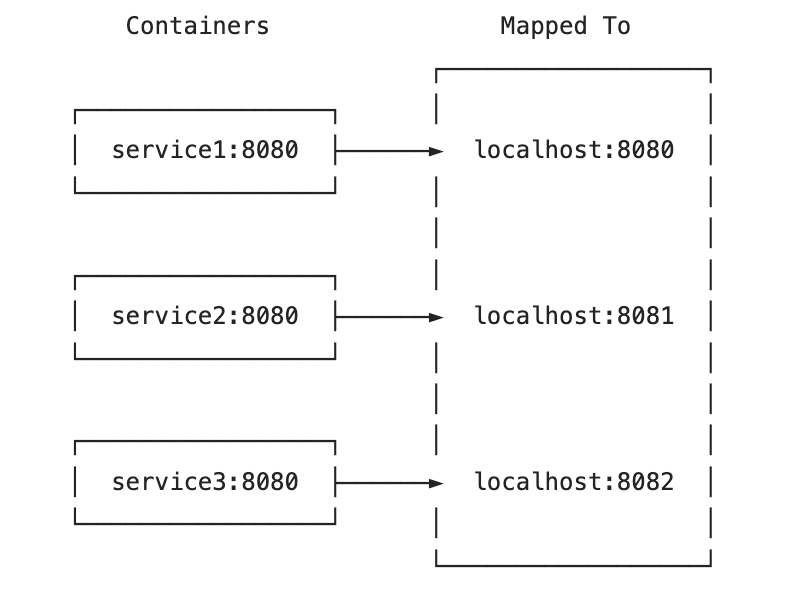
<p>Imagine a setup where you are running a set of containers, for example, using <code class="language-plaintext highlighter-rouge">docker-compose</code> and mapping them all to <code class="language-plaintext highlighter-rouge">my.cluster.host.com</code> (or even <code class="language-plaintext highlighter-rouge">localhost</code>)through several ports:</p>

<p><img src="https://mehmandarov.com/assets/images/posts-images/2024-03-30-microservices.png" alt="Microservice Setup" /></p>
<figcaption class="caption">Microservice Setup Example</figcaption>

<p>First, you will need to update <code class="language-plaintext highlighter-rouge">quarkus.live-reload.url</code> in the properties for all the apps (see <a href="https://quarkus.io/guides/maven-tooling#remote-development-mode">docs</a> on where and how to do this). Update the settings to the correct domain and port (in our case, it is <code class="language-plaintext highlighter-rouge">8080</code>, <code class="language-plaintext highlighter-rouge">8081</code>, or <code class="language-plaintext highlighter-rouge">8082</code>):</p>

<div class="language-properties highlighter-rouge"><div class="highlight"><pre class="highlight"><code><span class="py">quarkus.live-reload.url</span><span class="p">=</span><span class="s">http://localhost:8081</span>
</code></pre></div></div>

<p>Next, try starting your containers with the remote development mode enabled and connect to the application from a terminal or an IDE. For the second and the consecutive applications, the attempts to establish a connection you will see the following message in the logs:</p>

<pre><code class="language-commandline">$&gt; ./mvnw quarkus:remote-dev -Dquarkus.profile=dev

&lt; ... &gt;

[WARNING] Changed debug port to 57409 because of a port conflict
Listening for transport dt_socket at address: 57409

&lt; ... &gt;
</code></pre>

<p><em><strong>Note:</strong> Fallback ports will be random and may vary from the one above.</em></p>

<p>This setup will break the remote reloading from the terminal on the client side (i.e., your IDE). Two or more of your client applications now see that the default port <code class="language-plaintext highlighter-rouge">50005</code> for a remote debug is in use and start with a new, random port.</p>

<p>The simple fix is to update the debug ports for all other applications to something other than <code class="language-plaintext highlighter-rouge">5005</code>, such as <code class="language-plaintext highlighter-rouge">6006</code> and <code class="language-plaintext highlighter-rouge">6007</code>. Custom debug ports can be set in the <code class="language-plaintext highlighter-rouge">pom.xml</code> files, under <code class="language-plaintext highlighter-rouge">quarkus-maven-plugin</code>, for each of the applications that require this update:</p>

<div class="language-xml highlighter-rouge"><div class="highlight"><pre class="highlight"><code><span class="nt">&lt;build&gt;</span>
  <span class="nt">&lt;plugins&gt;</span>
    <span class="nt">&lt;plugin&gt;</span>
      <span class="nt">&lt;groupId&gt;</span>io.quarkus.platform<span class="nt">&lt;/groupId&gt;</span>
      <span class="nt">&lt;artifactId&gt;</span>quarkus-maven-plugin<span class="nt">&lt;/artifactId&gt;</span>
      <span class="nt">&lt;version&gt;</span>${quarkus.platform.version}<span class="nt">&lt;/version&gt;</span>
      <span class="c">&lt;!-- ADD THE CONFIGURATION MENTIONED BELOW THIS LINE --&gt;</span>
      <span class="nt">&lt;configuration&gt;</span>
        <span class="nt">&lt;debug&gt;</span>6006<span class="nt">&lt;/debug&gt;</span>
      <span class="nt">&lt;/configuration&gt;</span>
...
</code></pre></div></div>

<p>You can choose whether to update the debug ports for all applications in the cluster or for all applications except one, which will get the default port.</p>

<p>Now, you will need to rebuild your apps and re-initiate the remote development mode for each container. And, voilà, everything works!</p>

<p><strong><em>One last note</em></strong>: Please ensure you do not use the remote development functionality in the production environment.</p>

<h2 id="conclusion">Conclusion</h2>
<p>A tiny config update brings back the development joy of using remote development mode for more than one container simultaneously.</p>

<p><strong><em>Happy coding!</em></strong></p>]]></content><author><name>rustam.mehmandarov</name></author><category term="blog" /><category term="english" /><category term="java" /><category term="containers" /><category term="quarkus" /><category term="docker" /><summary type="html"><![CDATA[Running several simultaneous Quarkus app containers on your machine with the Quarkus’ remote development mode activated presents some challenges. Let’s have a look at how we can fix this.]]></summary><media:thumbnail xmlns:media="http://search.yahoo.com/mrss/" url="https://mehmandarov.com/assets/images/posts-images/container-ship.jpeg" /><media:content medium="image" url="https://mehmandarov.com/assets/images/posts-images/container-ship.jpeg" xmlns:media="http://search.yahoo.com/mrss/" /></entry><entry><title type="html">Cloud Security Principles: Part 2</title><link href="https://mehmandarov.com/cloud-security-principles-2/" rel="alternate" type="text/html" title="Cloud Security Principles: Part 2" /><published>2023-10-17T15:50:00+02:00</published><updated>2023-10-17T15:50:00+02:00</updated><id>https://mehmandarov.com/cloud-security-principles-2</id><content type="html" xml:base="https://mehmandarov.com/cloud-security-principles-2/"><![CDATA[<p><em>This is the second part of the series on the Cloud Security Principles. This post will look at some key principles for securing your applications. Similarly to the <a href="https://mehmandarov.com/cloud-security-principles/">first post</a>, some prior knowledge of various IT architecture and security concepts may be expected. This post was inspired by a talk I have recently done with <a href="https://linktr.ee/nehasardana">Neha Sardana</a> at JAX New York.</em></p>

<ul>
  <li><a href="#introduction">Introduction</a></li>
  <li><a href="#principles">Principles</a></li>
  <li><a href="#conclusion">Conclusion</a></li>
</ul>

<hr />

<h2 id="introduction">Introduction</h2>
<p><a href="https://mehmandarov.com/cloud-security-principles/">In the first part</a>, we have summed up all the essential elements to consider when working with Cloud and securing cloud-native applications/platforms. In this post, we would like to give you some concrete principles and tips for creating more secure applications.</p>

<h2 id="principles">Principles</h2>
<h3 id="multi-layered-defense">Multi-Layered Defense</h3>
<p><em><strong>Keywords</strong></em>: <code class="language-plaintext highlighter-rouge">general</code></p>

<p>First of all, a more generic but important principle: It would be best to look at security as a whole – integrating various security layers on multiple levels in any system. It should include cyber-security plans for:</p>

<ol>
  <li>Devices</li>
  <li>Applications</li>
  <li>Networks</li>
  <li>Infrastructure</li>
  <li>People</li>
</ol>

<p>Think of this principle as all the layers of clothing you wear to protect yourself from cold and bad weather. If one of the layers is compromised, there is always another to keep you warm and dry.</p>

<h3 id="identity-and-access-management-iam-misconfiguration">Identity and Access Management (IAM) Misconfiguration</h3>
<p><em><strong>Keywords</strong></em>: <code class="language-plaintext highlighter-rouge">network</code>, <code class="language-plaintext highlighter-rouge">permissions</code></p>

<p>You need to control access and permissions meticulously and over time.
Things to consider:</p>
<ul>
  <li>Implementing role-based access control (RBAC)</li>
  <li>Principle of least privilege</li>
  <li>Routines for updating and removing permissions when they are no longer needed.</li>
  <li>Explore possibilities for using time-based conditions for IAM policies.</li>
</ul>

<h3 id="api-security">API Security</h3>
<p><em><strong>Keywords</strong></em>: <code class="language-plaintext highlighter-rouge">endpoints</code>, <code class="language-plaintext highlighter-rouge">permissions</code></p>

<ul>
  <li>APIs act as the gateways to your application and data. Securing access to and securing them from known vulnerabilities is paramount to prevent unauthorized access and data breaches.</li>
  <li>Utilize <em>authentication</em>, <em>authorization</em>, and <em>API gateways</em> to control access and protect sensitive information. Don’t forget to monitor the software or libraries that make APIs available (e.g., runtimes, middleware)</li>
</ul>

<h3 id="data-encryption">Data Encryption</h3>
<p><em><strong>Keywords</strong></em>: <code class="language-plaintext highlighter-rouge">data</code></p>

<ul>
  <li>Safeguarding data at rest, in transit, and during processing is critical for your applications.</li>
  <li>Utilize encryption, tokenization, and data masking techniques to ensure data protection. Removing unnecessary sensitive information can simplify some of these tasks.</li>
  <li>If a platform or a Cloud provider provides the encryption, consider if you would like to use the standard keys for encryption or “bring your own” and manage them yourself or through a third party.</li>
  <li>Beware: Don’t write your own crypto! Ever.</li>
</ul>

<h3 id="zero-trust">Zero Trust</h3>
<p><em><strong>Keywords</strong></em>: <code class="language-plaintext highlighter-rouge">network</code>, <code class="language-plaintext highlighter-rouge">permissions</code></p>

<ul>
  <li>The Zero Trust security model assumes that no one is inherently trustworthy, even those within your network.</li>
  <li>This is opposed to more traditional approaches where perimeter security was prioritized over security inside the network.</li>
  <li>Adopting this approach, every request, user, and device is thoroughly verified before gaining access.</li>
  <li>Again: Implement the principle of least privilege, where users are only granted the minimum level of access required to perform their tasks.</li>
</ul>

<h3 id="software-supply-chain-security">Software Supply Chain Security</h3>
<p><em><strong>Keywords</strong></em>: <code class="language-plaintext highlighter-rouge">software</code>, <code class="language-plaintext highlighter-rouge">environment</code></p>

<ul>
  <li>Create <a href="https://www.cisa.gov/sbom">Software Bill of Materials (SBOM)</a> for your software</li>
  <li>Governance: Know where all the building blocks (artifacts) of your software are coming from.</li>
  <li>Automate security checks within your CI/CD pipeline to catch vulnerabilities early and often.</li>
  <li>Use static code analysis with tools like SonarQube to scan your code for potential security flaws and integrate those checks into your CI/CD pipeline to ensure continuous security monitoring.</li>
  <li>Use tools to monitor not only the code you develop yourself but also all the third-party libraries you utilize in your code.</li>
  <li>With DevSecOps, automated security security is becoming integral to the development process. Adopt it if you haven’t done so already.</li>
</ul>

<h3 id="secure-containerization">Secure Containerization</h3>
<p><em><strong>Keywords</strong></em>: <code class="language-plaintext highlighter-rouge">software</code>, <code class="language-plaintext highlighter-rouge">environment</code></p>

<ul>
  <li>Containerization and orchestration technologies, like Docker and Kubernetes, offer exceptional flexibility but also introduce security concerns.</li>
  <li>Securing containers and managing their lifecycle is vital to ensure a safe cloud environment.</li>
  <li>For example, use container scanning tools to identify vulnerabilities within container images before deploying them.</li>
  <li>Additionally, enforce strict security policies and segregate workloads using Kubernetes namespaces.</li>
</ul>

<h3 id="continuous-monitoring-and-incident-response">Continuous Monitoring and Incident Response</h3>
<p><em><strong>Keywords</strong></em>: <code class="language-plaintext highlighter-rouge">software</code>, <code class="language-plaintext highlighter-rouge">environment</code></p>

<ul>
  <li>The cloud landscape is constantly changing, and threats evolve rapidly. This means that we need to monitor not only for known threats but also for anomalies.</li>
  <li>Continuous monitoring and proactive incident response are essential to detect anomalies and respond swiftly to security incidents.</li>
  <li>For example, use cloud-native monitoring tools your Cloud or platform provider provides.</li>
  <li>Have good logging, but remember that more is not always better – log relevant information.</li>
</ul>

<h3 id="human-factors-including-social-engineering-misconfigurations-and-human-errors">Human Factors (including Social Engineering, Misconfigurations, and Human Errors)</h3>
<p><em><strong>Keywords</strong></em>: <code class="language-plaintext highlighter-rouge">people</code>, <code class="language-plaintext highlighter-rouge">human factors</code></p>

<ul>
  <li>82% of incidents are caused by human factors (<a href="https://www.verizon.com/business/resources/T39a/reports/dbir/2022-data-breach-investigations-report-dbir.pdf">2022 Data Breach Investigations Report</a>)</li>
  <li>Creating secure applications also implies providing security training for the system users.</li>
  <li>Social engineering and human factor has proven to be essential to creating secure applications.</li>
  <li>Consider running security awareness campaigns and employee training from user and developer perspectives.</li>
  <li>Automate routine and mundane tasks – humans often don’t enjoy carrying out tasks like this and are prone to errors; computers, on the other hand, excel at tasks like this!</li>
</ul>

<h2 id="conclusion">Conclusion</h2>
<p>You have probably heard that nothing is stronger than its weakest link. Therefore, it is important to look at various sides of the security. Especially in the Cloud, one size does not fit all when it comes to security. Cloud platforms, software, and threats constantly evolve and add to the complexity of creating secure applications.</p>

<p>Here, we have seen some of the principles to consider regarding the security of the platforms and application development for the Cloud and cloud-native applications in general.</p>

<p>Finally, note that this is not an exhaustive list but is instead meant to serve as a stepping stone to more secure application development.</p>

<hr />]]></content><author><name>rustam.mehmandarov</name></author><category term="blog" /><category term="english" /><category term="architecture" /><category term="security" /><category term="Cloud" /><summary type="html"><![CDATA[This is the second part of the series on the Cloud Security Principles. This post will look at some key principles for securing your applications. Similarly to the first post, some prior knowledge of various IT architecture and security concepts may be expected. This post was inspired by a talk I have recently done with Neha Sardana at JAX New York.]]></summary><media:thumbnail xmlns:media="http://search.yahoo.com/mrss/" url="https://mehmandarov.com/assets/images/posts-images/container-ship.jpeg" /><media:content medium="image" url="https://mehmandarov.com/assets/images/posts-images/container-ship.jpeg" xmlns:media="http://search.yahoo.com/mrss/" /></entry><entry><title type="html">Cloud Security Principles</title><link href="https://mehmandarov.com/cloud-security-principles/" rel="alternate" type="text/html" title="Cloud Security Principles" /><published>2023-10-12T09:50:00+02:00</published><updated>2023-10-12T09:50:00+02:00</updated><id>https://mehmandarov.com/cloud-security-principles</id><content type="html" xml:base="https://mehmandarov.com/cloud-security-principles/"><![CDATA[<p><em>This post was inspired by a talk I have recently done with <a href="https://linktr.ee/nehasardana">Neha Sardana</a> at JAX New York and is meant to serve as a stepping stone to categorize and catalog the things you need to consider working with the Cloud and Cloud-native applications. Some prior knowledge of various concepts within IT architecture and security may be expected for this post.</em></p>

<ul>
  <li><a href="#introduction">Introduction</a></li>
  <li><a href="#key-elements-of-a-cloud-security-architecture">Key Elements of a Cloud Security Architecture</a></li>
  <li><a href="#responsibilities">Responsibilities</a></li>
  <li><a href="#constantly-evolving-landscape">Constantly Evolving Landscape</a></li>
  <li><a href="#platform-security-architecture">Platform Security Architecture</a></li>
  <li><a href="#application-security-architecture">Application Security Architecture</a></li>
  <li><a href="#conclusion">Conclusion</a></li>
</ul>

<hr />

<h2 id="introduction">Introduction</h2>
<p>Whether you are running on the Cloud or not it is all about the <a href="https://www.techtarget.com/whatis/definition/Confidentiality-integrity-and-availability-CIA">CIA triad model</a> – Confidentiality, Integrity, and Availability.</p>

<p>When thinking about Cloud Security Architecture we need to be able to think about the whole stack. Of course, we don’t need to think about all the moving parts alone – it is a shared responsibility between the Cloud service provider and you, the user of the platform.</p>

<h2 id="key-elements-of-a-cloud-security-architecture">Key Elements of a Cloud Security Architecture</h2>
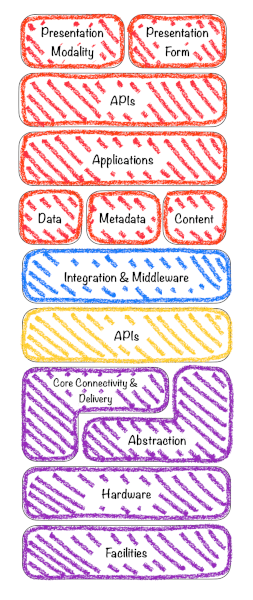
<p>Let’s first start by defining the key elements of a Cloud Security Architecture, divided across the layers of the stack, based on the Cloud Security Alliance (CSA) stack model.</p>

<p><img src="https://mehmandarov.com/assets/images/posts-images/2023-10-12-fig1.png" alt="Fig.1: Cloud Security Alliance (CSA) stack model" /></p>
<figcaption class="caption">Fig.1: Cloud Security Alliance (CSA) stack model</figcaption>

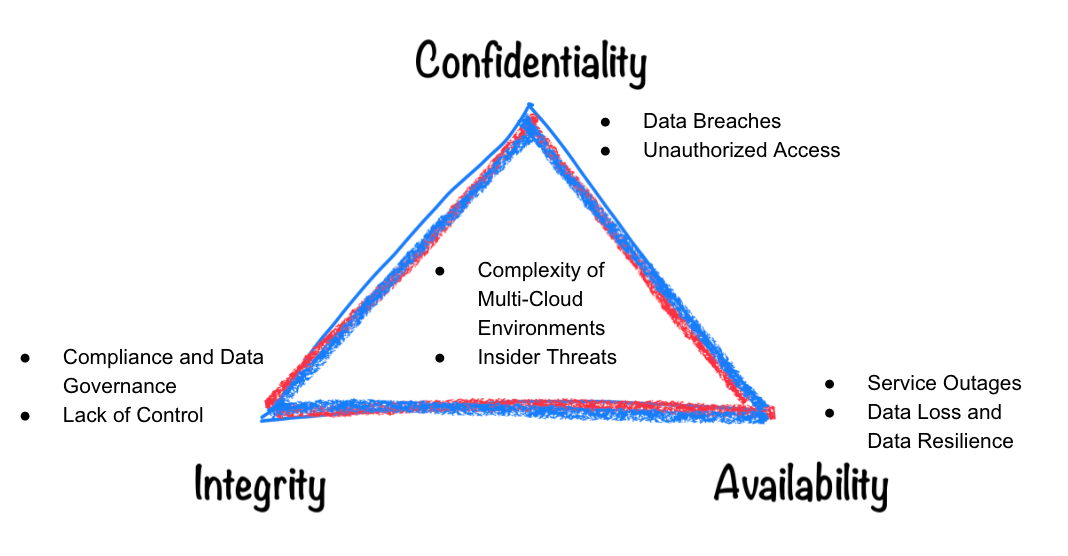
<p>Now, we can also mention some of the main challenges related to security, divided into separate groups, and try to map them to the CIA triad model that we have mentioned earlier.</p>

<h3 id="network-and-storage">Network and Storage</h3>
<ul>
  <li>Data Encryption</li>
  <li>Network Security</li>
</ul>

<h3 id="application-layer">Application layer</h3>
<ul>
  <li>Application Security</li>
  <li>Logging and Monitoring</li>
  <li>Identity and Access Management (IAM)</li>
</ul>

<h3 id="observability-and-traceability">Observability, and traceability</h3>
<ul>
  <li>Incident Response and Recovery</li>
  <li>Vendor and Third-Party Risk Management</li>
</ul>

<h3 id="devops">DevOps</h3>
<ul>
  <li>Automation and Orchestration</li>
  <li>Resilience and High Availability</li>
</ul>

<h3 id="general">General</h3>
<ul>
  <li>Compliance and Governance</li>
  <li>User Training and Awareness</li>
  <li>Cloud Provider Security Features</li>
</ul>

<p><img src="https://mehmandarov.com/assets/images/posts-images/2023-10-12-fig2.png" alt="Fig.2: Challenges of Cloud Security" /></p>
<figcaption class="caption">Fig.2: Challenges of Cloud Security</figcaption>

<h2 id="responsibilities">Responsibilities</h2>
<h3 id="shared-responsibility--intersection-of-responsibilities">Shared Responsibility + Intersection of Responsibilities</h3>
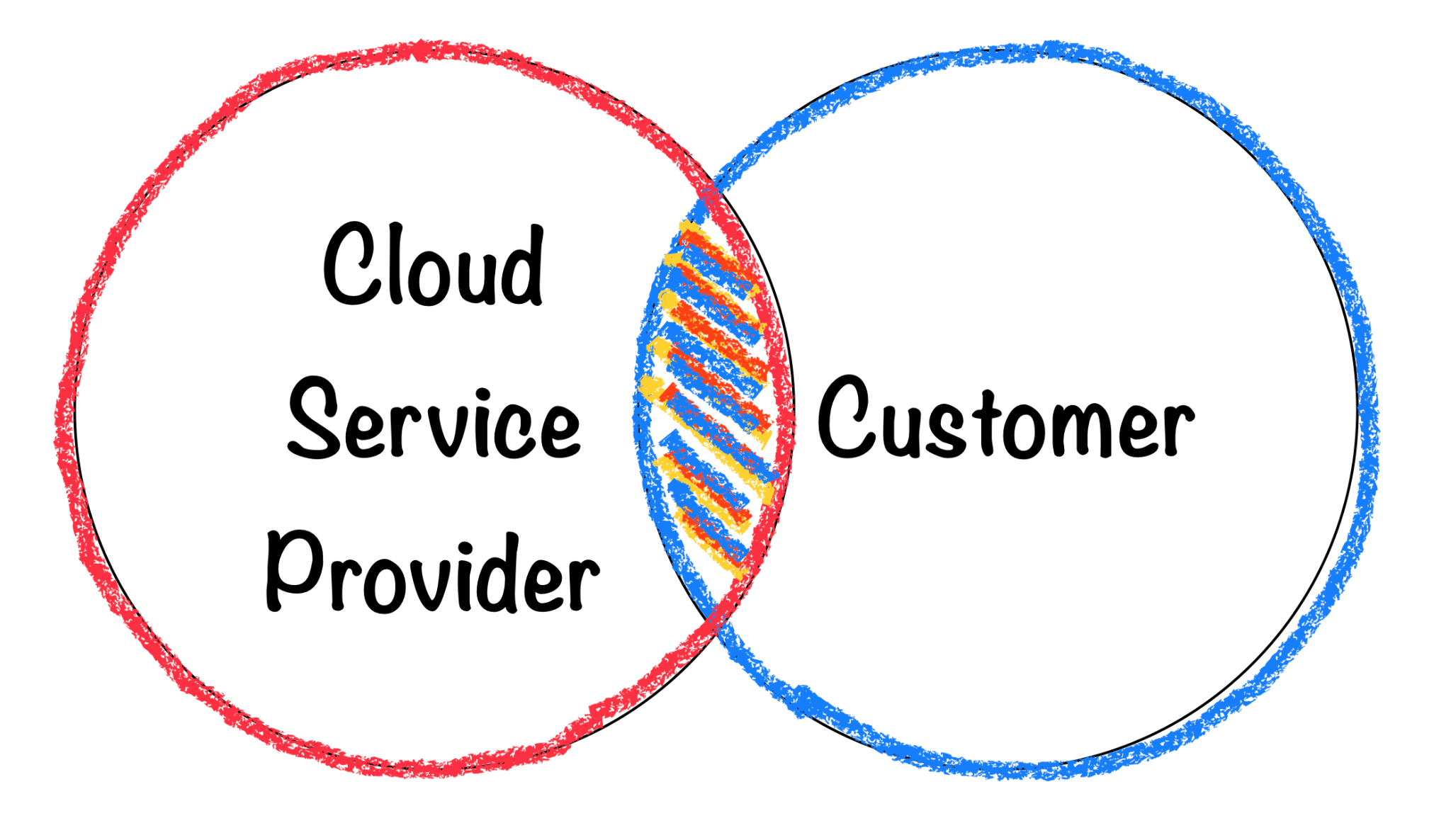
<p>Addressing all these challenges is a shared responsibility between the Cloud service provider and the customer and the division will vary depending on the type of the solution and whether you are using IaaS, PaaS, or SaaS.</p>

<p>Typically, Cloud service providers will take care of the lower parts of the stack, like physical, infrastructure, and platform security, while customers will be responsible for creating secure applications, securing their data, creating proper Identity and Access Management (IAM), and configuration management.</p>

<p>An effective overlap and a clear understanding of the responsibilities ensure comprehensive security coverage across all layers.</p>

<p><img src="https://mehmandarov.com/assets/images/posts-images/2023-10-12-fig3.png" alt="Fig.3: Shared security responsibility between the Cloud Service providers and the Customers" /></p>
<figcaption class="caption">Fig.3: Shared security responsibility between the Cloud Service providers and the Customers</figcaption>

<h2 id="constantly-evolving-landscape">Constantly Evolving Landscape</h2>
<h3 id="evolving-landscape--constant-change">Evolving Landscape == Constant Change</h3>
<p>One of the differentiating factors from regular application development is the constant change and evolution of the platform and tooling on one side, and the constantly evolving types of attacks and possibly larger attack surfaces on the other side.</p>

<p>These factors will lead to changes in the model and the responsibility division. The same might be influenced by the new services being introduced both from the side of the Cloud service provider and the customer (app developer).</p>

<p>Therefore, regular communication between the parties involved and staying updated on their security practices is essential to ensure secure Cloud applications.</p>

<h2 id="types-of-the-cloud-security-architecture">Types of the Cloud Security Architecture</h2>
<p>The Cloud Security Architecture is <em>twofold</em> – you will need to choose a <em>platform</em> for running your application and think about the security of the <em>application</em> you will be deploying on that platform.</p>

<h3 id="platform-security-architecture">Platform Security Architecture</h3>
<p>Let’s start with defining the types of platforms and list some of the key elements to consider when choosing a platform type.</p>

<h4 id="public-cloud-security-architecture">Public Cloud Security Architecture</h4>
<ul>
  <li>Designed for cloud services provided by third-party vendors (e.g., AWS, Azure, Google Cloud).</li>
  <li>Focuses on securing data and applications hosted on shared infrastructure.</li>
  <li>Utilizes the security features provided by the cloud service provider (CSP) while also implementing * additional security measures.</li>
  <li>Emphasizes network segmentation, encryption, IAM, and monitoring.</li>
</ul>

<h4 id="private-cloud-security-architecture">Private Cloud Security Architecture</h4>
<ul>
  <li>Created for cloud environments dedicated to a single organization.</li>
  <li>Offers more control over security settings and configurations.</li>
  <li>Often used by organizations with strict compliance requirements or sensitive data.</li>
  <li>Implements strong access controls, encryption, and strict network isolation.</li>
</ul>

<h4 id="hybrid-cloud-security-architecture">Hybrid Cloud Security Architecture</h4>
<ul>
  <li>Combines public and private clouds to take advantage of the benefits of both deployment models</li>
  <li>Security architecture addresses integration challenges and ensures consistency across environments</li>
  <li>Emphasizes secure communication between on-premises and cloud components</li>
  <li>Requires seamless identity and access management across both environments</li>
</ul>

<h4 id="multi-cloud-security-architecture">Multi-Cloud Security Architecture</h4>
<ul>
  <li>Involves using services from multiple cloud providers simultaneously</li>
  <li>Ensures compatibility and security across diverse cloud platforms</li>
  <li>Requires careful management of authentication, authorization, data protection, and compliance measures</li>
  <li>Aims to prevent vendor lock-in and distribute risk</li>
</ul>

<h3 id="application-security-architecture">Application Security Architecture</h3>
<p>Here are some things you will need to think about when developing modern applications for the Cloud and the cloud-native world.</p>

<h4 id="1-secure-your-code">1. Secure Your Code</h4>
<ul>
  <li>Software Supply Chain Security: Securing and monitoring your artifacts and third-party libraries.</li>
  <li>Making sure the code you have written is secure: OWASP Top 10, static code analysis, coding best practices.</li>
</ul>

<h4 id="2-your-container-and-serverless-security-architecture">2. Your Container (and Serverless) Security Architecture</h4>
<ul>
  <li>Specifically addresses security for containerized applications (e.g., Containers, Kubernetes) and serverless computing (e.g., AWS Lambda, Azure Functions, Cloud Functions, or Cloud Run on Google Cloud)</li>
  <li>Focus on securing microservices, communication between them, their orchestrators, and function-as-a-service (FaaS) platforms</li>
  <li>Involves isolating containers, securing images, and managing runtime security</li>
</ul>

<h4 id="3-add-devsecops-architecture-practices">3. Add DevSecOps Architecture Practices</h4>
<ul>
  <li>Integrate security practices into the DevOps process: DevSecOps</li>
  <li>Ensure security is considered at every stage of application development and deployment</li>
  <li>Involves automated security testing, vulnerability scanning, and security policy enforcement</li>
</ul>

<h4 id="4-cross-application-and-cross-container-communication-zero-trust-security-architecture">4. Cross-application and Cross-container communication: Zero Trust Security Architecture</h4>
<ul>
  <li>Assume no trust by default and require strict authentication and authorization for all users and devices</li>
  <li>Focus on identity verification, principle of least privilege, and continuous monitoring</li>
  <li>Suitable for cloud environments where traditional perimeter defenses are less effective</li>
</ul>

<h4 id="5-physical-security-edge-cloud-security-architecture">5. Physical security: Edge Cloud Security Architecture</h4>
<ul>
  <li>Address security concerns at the edge of the network, closer to where data is generated and consumed</li>
  <li>In case of having local edge hardware devices consider also physical security of those devices</li>
  <li>Involves considerations like local processing, secure communication, and protection against threats targeting edge devices</li>
</ul>

<h4 id="6-compliance-centric-security-architecture">6. Compliance-Centric Security Architecture</h4>
<ul>
  <li>Tailored to meet specific regulatory compliance requirements (e.g., GDPR, HIPAA, PCI DSS)</li>
  <li>Focus on implementing controls and safeguards to adhere to relevant standards</li>
</ul>

<h2 id="conclusion">Conclusion</h2>
<p>We have seen the key elements of the cloud security architecture and the building blocks of the whole stack. Furthermore, we have looked at the various types and elements to consider when it comes to the security of the platforms and application development. This is a stepping stone to categorize and group some of the main things you will need to consider when working with the Cloud and cloud-native applications.</p>

<hr />
<p><em>** Illustrations in this post: Rustam Mehmandarov.</em></p>

<hr />]]></content><author><name>rustam.mehmandarov</name></author><category term="blog" /><category term="english" /><category term="architecture" /><category term="security" /><category term="cloud" /><summary type="html"><![CDATA[This post was inspired by a talk I have recently done with Neha Sardana at JAX New York and is meant to serve as a stepping stone to categorize and catalog the things you need to consider working with the Cloud and Cloud-native applications. Some prior knowledge of various concepts within IT architecture and security may be expected for this post.]]></summary><media:thumbnail xmlns:media="http://search.yahoo.com/mrss/" url="https://mehmandarov.com/assets/images/posts-images/containers.jpg" /><media:content medium="image" url="https://mehmandarov.com/assets/images/posts-images/containers.jpg" xmlns:media="http://search.yahoo.com/mrss/" /></entry><entry><title type="html">It Is Alive! Again!</title><link href="https://mehmandarov.com/it-is-alive-again/" rel="alternate" type="text/html" title="It Is Alive! Again!" /><published>2023-01-15T18:50:00+01:00</published><updated>2023-01-15T18:50:00+01:00</updated><id>https://mehmandarov.com/it-is-alive-again</id><content type="html" xml:base="https://mehmandarov.com/it-is-alive-again/"><![CDATA[<p><em>Getting the site updated and rebooting blogging. It’s back!</em></p>

<hr />

<h2 id="welcome-back">Welcome back!</h2>

<p>Finally, after a long hibernation, this site is returning to life. Watch out for new posts coming to servers near you!</p>

<p>I look forward to seeing how the site will develop and future posts. Stay tuned!</p>

<hr />]]></content><author><name>rustam.mehmandarov</name></author><category term="blog" /><category term="english" /><summary type="html"><![CDATA[Getting the site updated and rebooting blogging. It’s back!]]></summary></entry><entry><title type="html">Building a Basic Apache Beam Pipeline in 4 Steps with Java</title><link href="https://mehmandarov.com/beam-pipeline-in-four-steps/" rel="alternate" type="text/html" title="Building a Basic Apache Beam Pipeline in 4 Steps with Java" /><published>2020-02-21T07:35:00+01:00</published><updated>2020-02-21T07:35:00+01:00</updated><id>https://mehmandarov.com/beam-pipeline-in-four-steps</id><content type="html" xml:base="https://mehmandarov.com/beam-pipeline-in-four-steps/"><![CDATA[<p><em>Getting started with building data pipelines using Apache Beam.</em></p>

<ul>
  <li><a href="#step-1-define-pipeline-options">Step 1: Define Pipeline Options</a></li>
  <li><a href="#step-2-create-the-pipeline">Step 2: Create the Pipeline</a></li>
  <li><a href="#step-3-apply-transformations">Step 3: Apply Transformations</a></li>
  <li><a href="#step-4-run-it">Step 4: Run it!</a></li>
  <li><a href="#conclusion">Conclusion</a></li>
</ul>

<hr />

<p>In this post, I would like to show you how you can get started with Apache Beam and build the first, simple data pipeline in 4 steps.</p>

<h2 id="step-1-define-pipeline-options">Step 1: Define Pipeline Options</h2>

<p>Let’s start with creating a helper object to configure our pipelines. This is not an absolute necessity, however defining the pipeline options might save you some time later, especially if your pipeline is dependent on a few arguments, that might have pre-defined, default values that you don’t want to provide at every run.</p>

<figure class="highlight"><pre><code class="language-java" data-lang="java"><span class="kd">public</span> <span class="kd">interface</span> <span class="nc">OsloCityBikeOptions</span> <span class="kd">extends</span> <span class="nc">PipelineOptions</span> <span class="o">{</span>

    <span class="cm">/**
     * By default, the code reads from a public dataset containing a subset of
     * bike station metadata for city bikes. Set this option to choose a different input file or glob
     * (i.e. partial names with *, like "*-stations.txt").
     */</span>
    <span class="nd">@Description</span><span class="o">(</span><span class="s">"Path of the file with the availability data"</span><span class="o">)</span>
    <span class="nd">@Default</span><span class="o">.</span><span class="na">String</span><span class="o">(</span><span class="s">"src/main/resources/bikedata-stations-example.txt"</span><span class="o">)</span>
    <span class="nc">String</span> <span class="nf">getStationMetadataInputFile</span><span class="o">();</span>
    <span class="kt">void</span> <span class="nf">setStationMetadataInputFile</span><span class="o">(</span><span class="nc">String</span> <span class="n">value</span><span class="o">);</span>

    <span class="c1">// some other options here...</span>
<span class="o">}</span></code></pre></figure>

<h2 id="step-2-create-the-pipeline">Step 2: Create the Pipeline</h2>

<p>Now that you have created the pipeline options object, you will need to create the pipeline object itself and provide the options to it:</p>

<figure class="highlight"><pre><code class="language-java" data-lang="java"><span class="nc">OsloCityBikeOptions</span> <span class="n">options</span> <span class="o">=</span> 
        <span class="nc">PipelineOptionsFactory</span><span class="o">.</span><span class="na">fromArgs</span><span class="o">(</span><span class="n">args</span><span class="o">)</span>
                                <span class="o">.</span><span class="na">withValidation</span><span class="o">()</span>
                                <span class="o">.</span><span class="na">as</span><span class="o">(</span><span class="nc">OsloCityBikeOptions</span><span class="o">.</span><span class="na">class</span><span class="o">);</span>

<span class="nc">Pipeline</span> <span class="n">pipeline</span> <span class="o">=</span> <span class="nc">Pipeline</span><span class="o">.</span><span class="na">create</span><span class="o">(</span><span class="n">options</span><span class="o">);</span></code></pre></figure>

<p>(<em>Check out the documentation for the <a href="https://beam.apache.org/releases/javadoc/2.19.0/org/apache/beam/sdk/options/PipelineOptionsFactory.html">PipelineOptionsFactory</a> class for the description of the methods used above.</em>)</p>

<h2 id="step-3-apply-transformations">Step 3: Apply Transformations</h2>

<p>After defining the pipeline and providing the options class, we can start by applying the transformations using <code class="language-plaintext highlighter-rouge">.apply(...)</code>. Those can be chained after each other by applying yet another <code class="language-plaintext highlighter-rouge">.apply(...)</code>, for instance:</p>

<figure class="highlight"><pre><code class="language-java" data-lang="java"><span class="nc">PCollection</span> <span class="o">&lt;</span><span class="no">KV</span><span class="o">&lt;</span><span class="nc">Integer</span><span class="o">,</span> <span class="nc">LinkedHashMap</span><span class="o">&gt;&gt;</span> <span class="n">stationMetadata</span> <span class="o">=</span> <span class="n">pipeline</span>
                <span class="o">.</span><span class="na">apply</span><span class="o">(</span><span class="s">"ReadLines: StationMetadataInputFiles"</span><span class="o">,</span> <span class="nc">TextIO</span><span class="o">.</span><span class="na">read</span><span class="o">().</span><span class="na">from</span><span class="o">(</span><span class="n">options</span><span class="o">.</span><span class="na">getStationMetadataInputFile</span><span class="o">()))</span>
                <span class="o">.</span><span class="na">apply</span><span class="o">(</span><span class="s">"Station Metadata"</span><span class="o">,</span> <span class="nc">ParDo</span><span class="o">.</span><span class="na">of</span><span class="o">(</span><span class="n">fnExtractStationMetaDataFromJSON</span><span class="o">()));</span>
                <span class="o">.</span><span class="na">apply</span><span class="o">(</span><span class="nc">MapElements</span><span class="o">.</span><span class="na">into</span><span class="o">(</span><span class="nc">TypeDescriptor</span><span class="o">.</span><span class="na">of</span><span class="o">(</span><span class="nc">String</span><span class="o">.</span><span class="na">class</span><span class="o">)).</span><span class="na">via</span><span class="o">(</span><span class="n">o</span> <span class="o">-&gt;</span> <span class="n">o</span><span class="o">.</span><span class="na">toString</span><span class="o">()))</span>
                <span class="o">.</span><span class="na">apply</span><span class="o">(</span><span class="s">"WriteStationMetaData"</span><span class="o">,</span> <span class="nc">TextIO</span><span class="o">.</span><span class="na">write</span><span class="o">().</span><span class="na">to</span><span class="o">(</span><span class="n">options</span><span class="o">.</span><span class="na">getMetadataOutput</span><span class="o">()));</span></code></pre></figure>

<p>Note that a <a href="https://beam.apache.org/releases/javadoc/2.19.0/org/apache/beam/sdk/values/PCollection.html"><code class="language-plaintext highlighter-rouge">PCollection&lt;T&gt;</code></a> is an immutable collection of values of type <code class="language-plaintext highlighter-rouge">T</code> and that you can provide names for the transformations as the first string argument in the <code class="language-plaintext highlighter-rouge">apply()</code>, like in the first two and the last <code class="language-plaintext highlighter-rouge">apply</code> methods.</p>

<p>Here we can also specify custom transformations that can be done in parallel. In Beam, they are being referred to as <a href="https://beam.apache.org/releases/javadoc/2.19.0/org/apache/beam/sdk/transforms/ParDo.html"><code class="language-plaintext highlighter-rouge">ParDo</code></a> methods. They are similar to the <code class="language-plaintext highlighter-rouge">Mapper</code> or <code class="language-plaintext highlighter-rouge">Reducer</code> class of a MapReduce-style algorithm. In this post, we will not be focusing on the contents of such pipeline (i.e. what it is doing), but a simple example of a <code class="language-plaintext highlighter-rouge">ParDo</code> can be looking like the second <code class="language-plaintext highlighter-rouge">apply</code> in the code above (look for the link in the <a href="#conclusion">conclusion</a> for the entire running example).</p>

<figure class="highlight"><pre><code class="language-java" data-lang="java"><span class="n">pipeline</span><span class="o">.</span><span class="na">apply</span><span class="o">(</span><span class="s">"Station Metadata"</span><span class="o">,</span> <span class="nc">ParDo</span><span class="o">.</span><span class="na">of</span><span class="o">(</span><span class="n">fnExtractStationMetaDataFromJSON</span><span class="o">()));</span></code></pre></figure>

<h2 id="step-4-run-it">Step 4: Run it!</h2>

<p>After defining the pipeline, its options, and how they are connected, we can finally run the pipeline. The great thing about running the pipelines in Apache Beam is that it is very easy to switch between various runners. Beam provides a portable API layer for building sophisticated pipelines that may be executed across various execution engines or <em>runners</em>. In our example, we can switch from running the pipeline locally (with <a href="https://beam.apache.org/documentation/runners/direct/"><code class="language-plaintext highlighter-rouge">direct-runner</code></a>), to running the same pipeline in the Cloud as a managed service (with <a href="https://beam.apache.org/documentation/runners/dataflow/"><code class="language-plaintext highlighter-rouge">dataflow-runner</code></a>) by simply adjusting the values we provide when running the code.</p>

<h3 id="local-runner">Local runner</h3>

<p>Here is an example of running the pipeline with <code class="language-plaintext highlighter-rouge">direct-runner</code>:</p>

<figure class="highlight"><pre><code class="language-bash" data-lang="bash">mvn compile <span class="nb">exec</span>:java <span class="se">\</span>
      <span class="nt">-Pdirect-runner</span> <span class="se">\</span>
      <span class="nt">-Dexec</span>.mainClass<span class="o">=</span>com.mehmandarov.beam.OsloCityBike <span class="se">\</span>
      <span class="nt">-Dexec</span>.args<span class="o">=</span><span class="s2">"--inputFile=src/data-example.txt </span><span class="se">\</span><span class="s2">
      --output=bikedatalocal"</span></code></pre></figure>

<h3 id="dataflow-runner">Dataflow runner</h3>

<p>And here is the example of running the same pipeline in the Cloud as a managed service, using Google Cloud Dataflow. Note that most of the parameters provided are still the same, with a few additional parameters needed for this specific runner.</p>

<figure class="highlight"><pre><code class="language-bash" data-lang="bash">mvn compile <span class="nb">exec</span>:java <span class="se">\</span>
      <span class="nt">-Pdataflow-runner</span> <span class="se">\</span>
      <span class="nt">-Dexec</span>.mainClass<span class="o">=</span>com.mehmandarov.beam.OsloCityBike <span class="se">\</span>
      <span class="nt">-Dexec</span>.args<span class="o">=</span><span class="s2">"--project=rm-cx-211107 </span><span class="se">\</span><span class="s2">
      --inputFile=gs://my_oslo_bike_data/data-2018-*.txt </span><span class="se">\</span><span class="s2">
      --stagingLocation=gs://my_oslo_bike_data/testing </span><span class="se">\</span><span class="s2">
      --output=gs://my_oslo_bike_data/testing/output </span><span class="se">\</span><span class="s2">
      --tempLocation=gs://my_oslo_bike_data/testing/ </span><span class="se">\</span><span class="s2">
      --runner=DataflowRunner </span><span class="se">\</span><span class="s2">
      --region=europe-west1"</span></code></pre></figure>

<h3 id="other-runners">Other runners</h3>
<p>In case you would like to be using various runners or interested in switching between them, it might be a good idea to check the <a href="https://beam.apache.org/documentation/runners/capability-matrix/">capability matrix</a> in the documentation, as the core concepts of Beam Model can sometimes be implemented to varying degrees in each of the Beam runners.</p>

<h2 id="conclusion">Conclusion</h2>
<p>We have now seen the basic steps needed to create a simple data-parallel processing pipeline and how that can be run and deployed both in the local and managed Cloud environments. We are were also able to run the same pipeline with just a few adjustments to the command line parameters and, in our case, without any changes to the pipeline code.</p>

<p>The entire working example that we have been using here can be found in <a href="https://github.com/mehmandarov/oslocitybike-basic-beam">my GitHub repository</a>, as well as a more advanced example in <a href="https://github.com/mehmandarov/oslocitybike-beam">another repository</a>.</p>]]></content><author><name>rustam.mehmandarov</name></author><category term="blog" /><category term="java" /><category term="apache beam" /><category term="data" /><category term="pipelines" /><category term="english" /><summary type="html"><![CDATA[Getting started with building data pipelines using Apache Beam Java SDK]]></summary><media:thumbnail xmlns:media="http://search.yahoo.com/mrss/" url="https://mehmandarov.com/assets/images/posts-images/pipes.jpg" /><media:content medium="image" url="https://mehmandarov.com/assets/images/posts-images/pipes.jpg" xmlns:media="http://search.yahoo.com/mrss/" /></entry><entry><title type="html">Getting a Graph Representation of a Pipeline in Apache Beam</title><link href="https://mehmandarov.com/apache-beam-pipeline-graph/" rel="alternate" type="text/html" title="Getting a Graph Representation of a Pipeline in Apache Beam" /><published>2019-11-27T08:15:00+01:00</published><updated>2019-11-27T08:15:00+01:00</updated><id>https://mehmandarov.com/apache-beam-pipeline-graph</id><content type="html" xml:base="https://mehmandarov.com/apache-beam-pipeline-graph/"><![CDATA[<p><em>Getting a pipeline representation in Apache Beam explained step-by-step.</em></p>

<ul>
  <li><a href="#intro">Intro</a></li>
  <li><a href="#tldr-getting-graph-representation">TL;DR: Getting Graph Representation</a></li>
  <li><a href="#a-full-example">A Full Example</a></li>
  <li><a href="#what-now">What Now?</a></li>
</ul>

<hr />

<h2 id="intro">Intro</h2>
<p>Constructing advanced pipelines, or trying to wrap your head around the existing pipelines, in <a href="https://beam.apache.org/">Apache Beam</a> can sometimes be challenging. We have seen some nice visual representations of the pipelines in the managed Cloud versions of this software, but figuring out how to get a graph representation of the pipeline required a little bit of research. Here is how it is done in a few steps using Beam’s Java SDK.</p>

<h2 id="tldr-getting-graph-representation">TL;DR: Getting Graph Representation</h2>

<p>If you just want to see a few lines that let you generate the <a href="https://en.wikipedia.org/wiki/DOT_(graph_description_language)">DOT</a> representation of the graph, here it is:</p>

<figure class="highlight"><pre><code class="language-java" data-lang="java"><span class="kn">import</span> <span class="nn">org.apache.beam.runners.core.construction.renderer.PipelineDotRenderer</span><span class="o">;</span>

<span class="nc">Pipeline</span> <span class="n">p</span> <span class="o">=</span> <span class="nc">Pipeline</span><span class="o">.</span><span class="na">create</span><span class="o">(</span><span class="n">options</span><span class="o">);</span>
<span class="c1">// do stuff with your pipeline</span>
<span class="nc">String</span> <span class="n">dotString</span> <span class="o">=</span> <span class="nc">PipelineDotRenderer</span><span class="o">.</span><span class="na">toDotString</span><span class="o">(</span><span class="n">p</span><span class="o">);</span></code></pre></figure>

<p>Now, if you want a slightly more comprehensive example, keep on reading.</p>

<h2 id="a-full-example">A Full Example</h2>
<p>Here we will be using <a href="https://beam.apache.org/get-started/quickstart-java/#get-the-wordcount-code">word count example</a>, particularly the <a href="https://github.com/apache/beam/blob/master/examples/java/src/main/java/org/apache/beam/examples/MinimalWordCount.java"><code class="language-plaintext highlighter-rouge">MinimalWordCount</code></a> class.</p>

<h4 id="adding-maven-dependency">Adding Maven Dependency</h4>
<p>First, we need to add a dependency to the Maven file under <code class="language-plaintext highlighter-rouge">&lt;dependencies&gt;</code> section:</p>

<figure class="highlight"><pre><code class="language-xml" data-lang="xml"><span class="nt">&lt;dependencies&gt;</span>
    <span class="c">&lt;!-- ... all the other dependencies you may have --&gt;</span>
    <span class="nt">&lt;dependency&gt;</span>
        <span class="nt">&lt;groupId&gt;</span>org.apache.beam<span class="nt">&lt;/groupId&gt;</span>
        <span class="nt">&lt;artifactId&gt;</span>beam-runners-core-construction-java<span class="nt">&lt;/artifactId&gt;</span>
        <span class="nt">&lt;version&gt;</span>${beam.version}<span class="nt">&lt;/version&gt;</span>
    <span class="nt">&lt;/dependency&gt;</span>
<span class="nt">&lt;/dependencies&gt;</span></code></pre></figure>

<h4 id="the-code">The Code</h4>
<p>Now, we will need to add a few imports (assuming you already added the Maven dependency mentioned earlier):</p>

<figure class="highlight"><pre><code class="language-java" data-lang="java"><span class="kn">import</span> <span class="nn">org.apache.beam.runners.core.construction.renderer.PipelineDotRenderer</span><span class="o">;</span>
<span class="kn">import</span> <span class="nn">org.slf4j.Logger</span><span class="o">;</span>
<span class="kn">import</span> <span class="nn">org.slf4j.LoggerFactory</span><span class="o">;</span></code></pre></figure>

<p>To get the <a href="https://en.wikipedia.org/wiki/DOT_(graph_description_language)">DOT</a> representation of the pipeline graph we will be passing the pipeline object to the <code class="language-plaintext highlighter-rouge">PipelineDotRenderer</code> class, and in this example, we are only logging the output to the console (hence the log4j imports).</p>

<figure class="highlight"><pre><code class="language-java" data-lang="java"><span class="c1">// Create the Pipeline object with the options we defined above</span>
<span class="nc">Pipeline</span> <span class="n">p</span> <span class="o">=</span> <span class="nc">Pipeline</span><span class="o">.</span><span class="na">create</span><span class="o">(</span><span class="n">options</span><span class="o">);</span>

<span class="c1">// ... do stuff with your pipeline ...</span>

<span class="c1">// Add this piece of code just before running the pipeline:</span>
<span class="kd">final</span> <span class="nc">Logger</span> <span class="n">log</span> <span class="o">=</span> <span class="nc">LoggerFactory</span><span class="o">.</span><span class="na">getLogger</span><span class="o">(</span><span class="nc">MinimalWordCount</span><span class="o">.</span><span class="na">class</span><span class="o">);</span>
<span class="nc">String</span> <span class="n">dotString</span> <span class="o">=</span> <span class="nc">PipelineDotRenderer</span><span class="o">.</span><span class="na">toDotString</span><span class="o">(</span><span class="n">p</span><span class="o">);</span>
<span class="n">log</span><span class="o">.</span><span class="na">info</span><span class="o">(</span><span class="s">"MY GRAPH REPR: "</span> <span class="o">+</span> <span class="n">dotString</span><span class="o">);</span>

<span class="n">p</span><span class="o">.</span><span class="na">run</span><span class="o">().</span><span class="na">waitUntilFinish</span><span class="o">();</span></code></pre></figure>

<p>That’s it. To see the code in action, run it from the command line:</p>

<figure class="highlight"><pre><code class="language-bash" data-lang="bash"><span class="nv">$ </span>mvn compile <span class="nb">exec</span>:java <span class="se">\</span>
        <span class="nt">-Dexec</span>.mainClass<span class="o">=</span>org.apache.beam.examples.MinimalWordCount <span class="se">\</span>
        <span class="nt">-Pdirect-runner</span></code></pre></figure>

<p>This code will produce a DOT representation of the pipeline and log it to the console.</p>

<h4 id="a-complete-example">A Complete Example</h4>

<p>A fully working example can be found in <a href="https://github.com/mehmandarov/word-count-mini-beam">my repository</a>, based on <a href="https://github.com/apache/beam/blob/master/examples/java/src/main/java/org/apache/beam/examples/MinimalWordCount.java"><code class="language-plaintext highlighter-rouge">MinimalWordCount</code></a>
code. There, in addition to logging to the console, we will be storing the DOT representation to a file.</p>

<p>In the next section, we will have a brief look at what can be done with the DOT representations.</p>

<h2 id="what-now">What Now?</h2>
<p>Now that we have a DOT representation of the pipeline graph, we can use it to get a better understanding of the pipeline. For instance, you can generate an SVG or a PNG image from the data. Note that the generated graph might be a bit verbose, but gives a good overview of the pipeline graph.</p>

<p>Here, I have also included examples of the <a href="https://github.com/mehmandarov/word-count-mini-beam/blob/master/pipeline_graph.dot">DOT graph</a> and the <a href="https://github.com/mehmandarov/word-count-mini-beam/blob/master/pipeline_graph.png">PNG file</a> generated for that particular pipeline.</p>

<p>Assuming that you have Graphviz <a href="https://www.graphviz.org/download/">tools</a> installed, you can convert a DOT file to a PNG image using this command:</p>

<figure class="highlight"><pre><code class="language-bash" data-lang="bash"><span class="nv">$ </span>dot <span class="nt">-Tpng</span> <span class="nt">-o</span> pipeline_graph.png pipeline_graph.dot</code></pre></figure>

<p>In addition to <a href="https://www.graphviz.org/">Grapgviz</a> (Wikipedia <a href="https://en.wikipedia.org/wiki/Graphviz">link</a>), there are also online services for converting DOT graphs to graphical representations, like <a href="https://dreampuf.github.io/GraphvizOnline">this</a> one.</p>

<p><img src="https://raw.githubusercontent.com/mehmandarov/word-count-mini-beam/master/pipeline_graph_partial.png" alt="Training your own model" class="bigger-image" /></p>
<figcaption class="caption">A part of a graphical representation for the pipeline in the MinimalWordCount example. </figcaption>

<hr />]]></content><author><name>rustam.mehmandarov</name></author><category term="blog" /><category term="java" /><category term="apachebeam" /><category term="data" /><category term="pipelines" /><category term="english" /><summary type="html"><![CDATA[How to get a graph representation of your data pipeline in Apache Beam, step by step.]]></summary><media:thumbnail xmlns:media="http://search.yahoo.com/mrss/" url="https://mehmandarov.com/assets/images/posts-images/golden-gate.jpg" /><media:content medium="image" url="https://mehmandarov.com/assets/images/posts-images/golden-gate.jpg" xmlns:media="http://search.yahoo.com/mrss/" /></entry><entry><title type="html">MicroProfile – Part 1: Defining End-Points</title><link href="https://mehmandarov.com/microprofile-101-part1/" rel="alternate" type="text/html" title="MicroProfile – Part 1: Defining End-Points" /><published>2019-07-29T07:25:00+02:00</published><updated>2019-07-29T07:25:00+02:00</updated><id>https://mehmandarov.com/microprofile-101-part1</id><content type="html" xml:base="https://mehmandarov.com/microprofile-101-part1/"><![CDATA[<p><em>Part 1: End-points in MicroProfile. This is a part of a series of posts to help you get started with microservices in MicroProfile and showing off some of the features it brings to the table.</em></p>

<ul>
  <li><a href="#intro">Intro</a></li>
  <li><a href="#getting-started">Getting started</a></li>
  <li><a href="#defining-end-points">Defining End-Points</a>
    <ul>
      <li><a href="#a-regular-json-end-point">A (Regular) JSON End-Point</a></li>
      <li><a href="#an-end-point-returning-an-image">An End-Point Returning an Image</a></li>
      <li><a href="#an-end-point-returning-a-pdf">An End-Point Returning a PDF</a></li>
    </ul>
  </li>
  <li><a href="#whats-next">What’s Next?</a></li>
</ul>

<hr />

<h2 id="intro">Intro</h2>

<p>In my previous two posts, I have been describing parts of a system for “checking-in” to a location using QR codes in Java. We started with <a href="https://mehmandarov.com/generating-qr-codes-with-secure-hashes-using-java/">generating QR codes</a>, followed by <a href="https://mehmandarov.com/generating-pdf-files-using-java/">generating PDF files</a>.</p>

<p>Now, I would like to focus on building microservices around that functionality. We will be creating a few HTTP end-points built with <a href="https://microprofile.io/">MicroProfile</a>. I will be using the next few posts as an opportunity to show off some of the features that you will be getting out of the box or with minimal effort using MicroProfile.</p>

<h2 id="getting-started">Getting started</h2>

<p><em>(Assuming that you have Git, Java 9+, and Maven installed.)</em></p>

<p>Since we will continue using the QR code generator project to showcase various features of MicroProfile, it might be a good idea to familiarize yourself with the code. You might want to start with taking a look at my previous two posts that explain the code for <a href="https://mehmandarov.com/generating-qr-codes-with-secure-hashes-using-java/">generating QR codes</a>, and <a href="https://mehmandarov.com/generating-pdf-files-using-java/">generating PDF files</a> in detail.</p>

<p>Now you can clone the <a href="https://github.com/mehmandarov/microprofile-qrcodes/">project</a> and examine the Maven dependencies in the <a href="https://github.com/mehmandarov/microprofile-qrcodes/blob/master/pom.xml"><code class="language-plaintext highlighter-rouge">pom.xml</code></a> file, as well as any other MicroProfile related dependencies.</p>

<p>After cloning and opening the project in your favorite IDE, build it (again, assuming that you have Java and Maven installed) with the following command in a terminal:</p>

<figure class="highlight"><pre><code class="language-bash" data-lang="bash"><span class="nv">$ </span>mvn clean package</code></pre></figure>

<p>When the project is done building and you have got a <code class="language-plaintext highlighter-rouge">Build Success</code> from Maven, you can run the project to make sure everything runs fine:</p>

<figure class="highlight"><pre><code class="language-bash" data-lang="bash"><span class="nv">$ </span>java <span class="nt">-jar</span> target/qrcreator.jar</code></pre></figure>

<p>In a few seconds it takes for the app server to start-up, you should be able to access the starter page at <a href="http://localhost:8181/qrcreator/index.html"><code class="language-plaintext highlighter-rouge">http://localhost:8181/qrcreator/index.html</code></a>.</p>

<h2 id="defining-end-points">Defining End-Points</h2>

<p>One of the most obvious features any microservice needs is an end-point to receive requests and respond with some kind of data back. Let’s have a closer look into how this is done in MicroProfile. First of all, we will need to define the application path that serves as the base URI for all resource URIs (think of it as a “root” URL) and make sure that the class where it is defined extends <code class="language-plaintext highlighter-rouge">javax.ws.rs.core.Application</code>, like in <a href="https://github.com/mehmandarov/microprofile-qrcodes/blob/master/src/main/java/com/mehmandarov/qrcreator/ApplicationEntryPoint.java"><code class="language-plaintext highlighter-rouge">ApplicationEntryPoint</code></a> class here:</p>

<figure class="highlight"><pre><code class="language-java" data-lang="java"><span class="kn">package</span> <span class="nn">com.mehmandarov.qrcreator</span><span class="o">;</span>

<span class="kn">import</span> <span class="nn">javax.ws.rs.ApplicationPath</span><span class="o">;</span>
<span class="kn">import</span> <span class="nn">javax.ws.rs.core.Application</span><span class="o">;</span>

<span class="cm">/**
 * Sets the application path that serves as the base URI for
 * all resource URIs provided by @Path annotation.
 */</span>
<span class="nd">@ApplicationPath</span><span class="o">(</span><span class="s">"/api"</span><span class="o">)</span>

<span class="kd">public</span> <span class="kd">class</span> <span class="nc">ApplicationEntryPoint</span> <span class="kd">extends</span> <span class="nc">Application</span> <span class="o">{</span>
<span class="o">}</span></code></pre></figure>

<p>This will set up all the end-point URLs to start with <code class="language-plaintext highlighter-rouge">/api</code>, in our case <a href="http://localhost:8181/qrcreator/api/"><code class="language-plaintext highlighter-rouge">http://localhost:8181/qrcreator/api/</code></a>.</p>

<h4 id="a-regular-json-end-point">A (Regular) JSON End-Point</h4>

<p>Now, let’s define some endpoints. We will start with a most regular kind – a JSON end-point. This is probably the most common end-point you will encounter.</p>

<p>We will start with creating one that would respond to requests sent to <a href="http://localhost:8181/qrcreator/api/somestring/json"><code class="language-plaintext highlighter-rouge">/api/somestring/json</code></a>. Note that as you can see from the code below, <code class="language-plaintext highlighter-rouge">@Path</code> defines <code class="language-plaintext highlighter-rouge">somestring</code> in the URL as an <code class="language-plaintext highlighter-rouge">id</code> that is passed on as an argument to the <code class="language-plaintext highlighter-rouge">createIdKeyTuple</code> method.</p>

<p>We will also define a type of a request (in this case it is a <code class="language-plaintext highlighter-rouge">GET</code> request) and specify that it will be returning a JSON document with <code class="language-plaintext highlighter-rouge">@Produces</code> annotation.</p>

<figure class="highlight"><pre><code class="language-java" data-lang="java"><span class="nd">@GET</span>
<span class="nd">@Path</span><span class="o">(</span><span class="s">"{id}/json"</span><span class="o">)</span>
<span class="nd">@Produces</span><span class="o">(</span><span class="s">"application/json"</span><span class="o">)</span>
<span class="kd">public</span> <span class="nc">Response</span> <span class="nf">createIdKeyTuple</span><span class="o">(</span><span class="nd">@PathParam</span><span class="o">(</span><span class="s">"id"</span><span class="o">)</span> <span class="nc">String</span> <span class="n">id</span><span class="o">)</span> <span class="o">{</span>
    <span class="o">...</span>
<span class="o">}</span></code></pre></figure>

<p>Now, that we are done with annotations for the method, let’s have a look at the code for this method, that defines a JSON end-point in the <a href="https://github.com/mehmandarov/microprofile-qrcodes/blob/master/src/main/java/com/mehmandarov/qrcreator/QRController.java"><code class="language-plaintext highlighter-rouge">QRController</code></a> class:</p>

<figure class="highlight"><pre><code class="language-java" data-lang="java"><span class="nd">@GET</span>
<span class="nd">@Path</span><span class="o">(</span><span class="s">"{id}/json"</span><span class="o">)</span>
<span class="nd">@Produces</span><span class="o">(</span><span class="s">"application/json"</span><span class="o">)</span>
<span class="kd">public</span> <span class="nc">Response</span> <span class="nf">createIdKeyTuple</span><span class="o">(</span><span class="nd">@PathParam</span><span class="o">(</span><span class="s">"id"</span><span class="o">)</span> <span class="nc">String</span> <span class="n">id</span><span class="o">)</span> <span class="o">{</span>
    <span class="nc">String</span> <span class="n">nameKeyTuple</span> <span class="o">=</span> <span class="kc">null</span><span class="o">;</span>
    <span class="k">try</span> <span class="o">{</span>
        <span class="n">nameKeyTuple</span> <span class="o">=</span> <span class="n">qrCodeContentsSupplier</span><span class="o">.</span><span class="na">getQRCodeContents</span><span class="o">(</span><span class="n">id</span><span class="o">);</span>
        <span class="k">return</span> <span class="nc">Response</span><span class="o">.</span><span class="na">ok</span><span class="o">(</span><span class="n">nameKeyTuple</span><span class="o">).</span><span class="na">build</span><span class="o">();</span>
    <span class="o">}</span> <span class="k">catch</span> <span class="o">(</span><span class="nc">InvalidKeySpecException</span> <span class="n">e</span><span class="o">)</span> <span class="o">{</span>
        <span class="n">e</span><span class="o">.</span><span class="na">printStackTrace</span><span class="o">();</span>
    <span class="o">}</span> <span class="k">catch</span> <span class="o">(</span><span class="nc">NoSuchAlgorithmException</span> <span class="n">e</span><span class="o">)</span> <span class="o">{</span>
        <span class="n">e</span><span class="o">.</span><span class="na">printStackTrace</span><span class="o">();</span>
    <span class="o">}</span> <span class="k">catch</span> <span class="o">(</span><span class="nc">Exception</span> <span class="n">e</span><span class="o">)</span> <span class="o">{</span>
        <span class="n">e</span><span class="o">.</span><span class="na">printStackTrace</span><span class="o">();</span>
    <span class="o">}</span>
    <span class="k">return</span> <span class="nc">Response</span><span class="o">.</span><span class="na">serverError</span><span class="o">().</span><span class="na">build</span><span class="o">();</span>
<span class="o">}</span></code></pre></figure>

<p>Note that in this code we have only simple exception handling that makes sure we return a correct HTTP status code – OK (200) on a success and server error (500) on an internal error. You can later add other HTTP codes based on your needs.</p>

<h4 id="an-end-point-returning-an-image">An End-Point Returning an Image</h4>

<p>Returning an image instead of a JSON document is quite similar to the code we have already seen. Here we will have to pay attention to three aspects:</p>

<ul>
  <li>Different MIME type defined in <code class="language-plaintext highlighter-rouge">@Produces</code> annotation: <code class="language-plaintext highlighter-rouge">@Produces("image/png")</code></li>
  <li>Additional elements in the response header that let you control how the created file is displayed in the browser, i.e. shown in the browser “inline”, or made available through a download dialog – <code class="language-plaintext highlighter-rouge">"Content-Disposition", "inline;"</code> (see specs for <a href="https://developer.mozilla.org/en-US/docs/Web/HTTP/Headers/Content-Disposition"><code class="language-plaintext highlighter-rouge">Content-Disposition</code></a> for more details)</li>
  <li>Additional elements in the response header that let you control the name for the created file: <code class="language-plaintext highlighter-rouge">filename=\"" + id + ".png\"</code></li>
</ul>

<p>Let’s have a look at the whole method:</p>

<figure class="highlight"><pre><code class="language-java" data-lang="java"><span class="nd">@GET</span>
<span class="nd">@Path</span><span class="o">(</span><span class="s">"{id}"</span><span class="o">)</span>
<span class="nd">@Produces</span><span class="o">(</span><span class="s">"image/png"</span><span class="o">)</span>
<span class="kd">public</span> <span class="nc">Response</span> <span class="nf">createQR</span><span class="o">(</span><span class="nd">@PathParam</span><span class="o">(</span><span class="s">"id"</span><span class="o">)</span> <span class="nc">String</span> <span class="n">id</span><span class="o">)</span> <span class="o">{</span>
    <span class="k">try</span> <span class="o">{</span>
        <span class="kt">byte</span><span class="o">[]</span> <span class="n">imageData</span> <span class="o">=</span> <span class="n">qrCodeSupplier</span><span class="o">.</span><span class="na">qrCodeGenerator</span><span class="o">(</span><span class="n">id</span><span class="o">);</span>
        <span class="k">return</span> <span class="nc">Response</span><span class="o">.</span><span class="na">ok</span><span class="o">(</span><span class="n">imageData</span><span class="o">)</span>
            <span class="o">.</span><span class="na">header</span><span class="o">(</span><span class="s">"Content-Disposition"</span><span class="o">,</span> <span class="s">"inline; filename=\""</span> <span class="o">+</span> <span class="n">id</span> <span class="o">+</span> <span class="s">".png\""</span><span class="o">)</span>
            <span class="o">.</span><span class="na">build</span><span class="o">();</span>
    <span class="o">}</span> <span class="k">catch</span> <span class="o">(</span><span class="nc">WriterException</span> <span class="n">e</span><span class="o">)</span> <span class="o">{</span>
        <span class="n">e</span><span class="o">.</span><span class="na">printStackTrace</span><span class="o">();</span>
    <span class="o">}</span> <span class="k">catch</span> <span class="o">(</span><span class="nc">IOException</span> <span class="n">e</span><span class="o">)</span> <span class="o">{</span>
        <span class="n">e</span><span class="o">.</span><span class="na">printStackTrace</span><span class="o">();</span>
    <span class="o">}</span> <span class="k">catch</span> <span class="o">(</span><span class="nc">NoSuchAlgorithmException</span> <span class="n">e</span><span class="o">)</span> <span class="o">{</span>
        <span class="n">e</span><span class="o">.</span><span class="na">printStackTrace</span><span class="o">();</span>
    <span class="o">}</span> <span class="k">catch</span> <span class="o">(</span><span class="nc">InvalidKeySpecException</span> <span class="n">e</span><span class="o">)</span> <span class="o">{</span>
        <span class="n">e</span><span class="o">.</span><span class="na">printStackTrace</span><span class="o">();</span>
    <span class="o">}</span> <span class="k">catch</span> <span class="o">(</span><span class="nc">Exception</span> <span class="n">e</span><span class="o">)</span> <span class="o">{</span>
        <span class="n">e</span><span class="o">.</span><span class="na">printStackTrace</span><span class="o">();</span>
    <span class="o">}</span>
    <span class="k">return</span> <span class="nc">Response</span><span class="o">.</span><span class="na">serverError</span><span class="o">().</span><span class="na">build</span><span class="o">();</span>
<span class="o">}</span></code></pre></figure>

<p>It is worth noting that the number of <code class="language-plaintext highlighter-rouge">catch</code> statements in the <code class="language-plaintext highlighter-rouge">try...catch</code> clause will vary and depend on the number and type of exceptions that can be thrown by the underlying methods.</p>

<h4 id="an-end-point-returning-a-pdf">An End-Point Returning a PDF</h4>

<p>The last method for today – defining an end-point for returning PDF files – is nearly identical to the one we used for returning images, except for one thing:</p>

<ul>
  <li>Different MIME type and explicit file encoding in <code class="language-plaintext highlighter-rouge">@Produces</code>: <code class="language-plaintext highlighter-rouge">@Produces("application/pdf; charset=utf-8")</code>.</li>
</ul>

<figure class="highlight"><pre><code class="language-java" data-lang="java"><span class="nd">@GET</span>
<span class="nd">@Path</span><span class="o">(</span><span class="s">"{id}/pdf"</span><span class="o">)</span>
<span class="nd">@Produces</span><span class="o">(</span><span class="s">"application/pdf; charset=utf-8"</span><span class="o">)</span>
<span class="kd">public</span> <span class="nc">Response</span> <span class="nf">createQRPDF</span><span class="o">(</span><span class="nd">@PathParam</span><span class="o">(</span><span class="s">"id"</span><span class="o">)</span> <span class="nc">String</span> <span class="n">id</span><span class="o">)</span> <span class="o">{</span>
    <span class="k">try</span> <span class="o">{</span>
        <span class="kt">byte</span><span class="o">[]</span> <span class="n">pdfDocument</span> <span class="o">=</span> <span class="n">pdfDocumentSupplier</span><span class="o">.</span><span class="na">pdfDocumentGenerator</span><span class="o">(</span><span class="n">id</span><span class="o">);</span>
        <span class="k">return</span> <span class="nc">Response</span><span class="o">.</span><span class="na">ok</span><span class="o">(</span><span class="n">pdfDocument</span><span class="o">)</span>
            <span class="o">.</span><span class="na">header</span><span class="o">(</span><span class="s">"Content-Disposition"</span><span class="o">,</span> <span class="s">"inline; filename=\""</span> <span class="o">+</span> <span class="n">id</span> <span class="o">+</span> <span class="s">".pdf\""</span><span class="o">)</span>
            <span class="o">.</span><span class="na">build</span><span class="o">();</span>
    <span class="o">}</span> <span class="k">catch</span> <span class="o">(</span><span class="nc">WriterException</span> <span class="n">e</span><span class="o">)</span> <span class="o">{</span>
        <span class="n">e</span><span class="o">.</span><span class="na">printStackTrace</span><span class="o">();</span>
    <span class="o">}</span> <span class="k">catch</span> <span class="o">(</span><span class="nc">IOException</span> <span class="n">e</span><span class="o">)</span> <span class="o">{</span>
        <span class="n">e</span><span class="o">.</span><span class="na">printStackTrace</span><span class="o">();</span>
    <span class="o">}</span> <span class="k">catch</span> <span class="o">(</span><span class="nc">NoSuchAlgorithmException</span> <span class="n">e</span><span class="o">)</span> <span class="o">{</span>
        <span class="n">e</span><span class="o">.</span><span class="na">printStackTrace</span><span class="o">();</span>
    <span class="o">}</span> <span class="k">catch</span> <span class="o">(</span><span class="nc">InvalidKeySpecException</span> <span class="n">e</span><span class="o">)</span> <span class="o">{</span>
        <span class="n">e</span><span class="o">.</span><span class="na">printStackTrace</span><span class="o">();</span>
    <span class="o">}</span> <span class="k">catch</span> <span class="o">(</span><span class="nc">Exception</span> <span class="n">e</span><span class="o">)</span> <span class="o">{</span>
        <span class="n">e</span><span class="o">.</span><span class="na">printStackTrace</span><span class="o">();</span>
    <span class="o">}</span>
    <span class="k">return</span> <span class="nc">Response</span><span class="o">.</span><span class="na">serverError</span><span class="o">().</span><span class="na">build</span><span class="o">();</span>
<span class="o">}</span></code></pre></figure>

<p>Of course, there are also obvious differences in the contents of the <code class="language-plaintext highlighter-rouge">byte[]</code> array, but I consider that being outside the scope of this post – you can study those differences on your own.</p>

<h2 id="whats-next">What’s Next?</h2>

<p>Here we have seen how easy it is to define an end-point that can return documents with various MIME types. In the next posts, we will be taking a closer look at things like how you can equip your end-points with metrics, provide auto-generated documentation based on OpenAPI, and add more resilience with fail-over and circuit-breakers.</p>

<hr />]]></content><author><name>rustam.mehmandarov</name></author><category term="blog" /><category term="java" /><category term="microservices" /><category term="microprofile" /><category term="english" /><summary type="html"><![CDATA[Getting started with MicroProfile – defining end-points for JSON, images, and PDF responses.]]></summary><media:thumbnail xmlns:media="http://search.yahoo.com/mrss/" url="https://mehmandarov.com/assets/images/posts-images/lego-record-shop.jpg" /><media:content medium="image" url="https://mehmandarov.com/assets/images/posts-images/lego-record-shop.jpg" xmlns:media="http://search.yahoo.com/mrss/" /></entry><entry><title type="html">Generating PDF Files Using Java</title><link href="https://mehmandarov.com/generating-pdf-files-using-java/" rel="alternate" type="text/html" title="Generating PDF Files Using Java" /><published>2019-06-21T07:01:00+02:00</published><updated>2019-06-21T07:01:00+02:00</updated><id>https://mehmandarov.com/generating-pdf-files-using-java</id><content type="html" xml:base="https://mehmandarov.com/generating-pdf-files-using-java/"><![CDATA[<p><em>A step by step tutorial on how to generate PDF files in Java.</em></p>

<ul>
  <li><a href="#intro">Intro</a></li>
  <li><a href="#choosing-a-library">Choosing a Library</a></li>
  <li><a href="#generating-pdf-files">Generaring PDF Files</a>
    <ul>
      <li><a href="#adding-maven-dependency">Adding Maven Dependency</a></li>
      <li><a href="#getting-started-with-the-code">Getting Started With the Code</a></li>
      <li><a href="#adding-text">Adding Text</a></li>
      <li><a href="#adding-images">Adding Images</a></li>
      <li><a href="#adding-metadata-to-the-document">Adding Metadata to the Document</a></li>
      <li><a href="#closing-saving-and-returning-the-document">Closing, Saving and Returning the Document</a></li>
    </ul>
  </li>
  <li><a href="#what-now">What Now?</a></li>
</ul>

<hr />

<h2 id="intro">Intro</h2>

<p>In my previous post, I have started describing a <a href="https://mehmandarov.com/generating-qr-codes-with-secure-hashes-using-java/">system for “checking-in” to a location using QR codes in Java</a>. Now, I would like to describe another part of that system that will show you how to get started with generating PDF files using Java.</p>

<p>So, let’s have a look at how this can be implemented in your solution – step by step.</p>

<h2 id="choosing-a-library">Choosing a Library</h2>

<p>Generating PDFs is normally something you would like to do using 3rd party libraries, and there are quite a few alternatives available. While choosing a library it might be a good idea to have a closer look at the licensing for that library – some of them might be very permissive and some might force your code to comply to a specific licensing. Some libraries even come with dual licensing, one under a proprietary model and one supporting an open source model.</p>

<p>One should also consider other aspects like maturity and whether it is a high- or low-level library. The latter will tell you how much code you will actually end up writing to implement your features. In the course of this project, I ended up trying two different libraries – <a href="https://itextpdf.com/en">iText</a> and, later, <a href="https://pdfbox.apache.org/">Apache PDFBox</a>. Since the point of this code was a tutorial, I decided to stick with PDFBox as it is distributed under more permissive license – <a href="https://tldrlegal.com/license/apache-license-2.0-(apache-2.0)">Apache License 2.0</a>, as opposed to dual licensed iText that is under <a href="https://tldrlegal.com/license/gnu-affero-general-public-license-v3-(agpl-3.0)">AGPL</a> and a commercial license.</p>

<h2 id="generating-pdf-files">Generating PDF Files</h2>

<p>As mentioned earlier, this library provides quite extensive functionality for generating PDF files, but it is also quite low-level, so you will have to be prepared to implement a few things you might usually take for granted, e.g. things like calculating coordinates for text that has to be centered on a page and a few other things. However, the library has a great community, so it is quite easy to get help.</p>

<h4 id="adding-maven-dependency">Adding Maven Dependency</h4>
<p>Ok, let’s get started. First things first, you will need to add the following dependencies to your <code class="language-plaintext highlighter-rouge">pom.xml</code> to use PDFBox (assuming you are using Maven to build your project):</p>

<figure class="highlight"><pre><code class="language-xml" data-lang="xml">    <span class="nt">&lt;dependency&gt;</span>
      <span class="nt">&lt;groupId&gt;</span>org.apache.pdfbox<span class="nt">&lt;/groupId&gt;</span>
      <span class="nt">&lt;artifactId&gt;</span>pdfbox<span class="nt">&lt;/artifactId&gt;</span>
      <span class="nt">&lt;version&gt;</span>2.0.15<span class="nt">&lt;/version&gt;</span>
    <span class="nt">&lt;/dependency&gt;</span></code></pre></figure>

<h4 id="getting-started-with-the-code">Getting Started With the Code</h4>
<p>For this post, I decided to paste the source code for the whole function doing the PDF generation and separate it with a few sentences, explaining the most interesting parts of the code. You can always piece the code together, or just have a look at the code in <a href="https://github.com/mehmandarov/microprofile-qrcodes/blob/master/src/main/java/com/mehmandarov/qrcreator/document/PDFDocumentSupplier.java">my repo</a>. (<em>Bonus: If you are interested in how much work it was to port the code from iText to PDFBox, this <a href="https://github.com/mehmandarov/microprofile-qrcodes/commit/bf53ec918dbc0a2e64c1c830aa4995ef63cee52e">commit</a> should give you a rough idea.</em>)</p>

<p>We start with defining a document object, a page object and add a page to a document. Afterwards, we create a content stream object that will be added to the page and document objects. This object will be responsible for holding the text and images we will be generating here.</p>

<figure class="highlight"><pre><code class="language-java" data-lang="java"><span class="c1">// Assume that the following variables are declared and set:</span>
<span class="c1">//   QRCodeSupplier qrCodeSupplier - to generate QR codes, shown in the previous post</span>
<span class="c1">//   String id - a string that will be shown on the top of the PDF file and used in the QR code</span>
<span class="c1">//   String timeZone - a string containing current time zone</span>

<span class="nc">String</span> <span class="n">headerTitle</span> <span class="o">=</span> <span class="n">id</span><span class="o">;</span>
<span class="nc">PDFont</span> <span class="n">headerFont</span> <span class="o">=</span> <span class="nc">PDType1Font</span><span class="o">.</span><span class="na">COURIER_BOLD</span><span class="o">;</span>

<span class="kt">int</span> <span class="n">marginTop</span> <span class="o">=</span> <span class="mi">30</span><span class="o">;</span>
<span class="kt">int</span> <span class="n">fontSize</span> <span class="o">=</span> <span class="mi">30</span><span class="o">;</span>

<span class="nc">PDDocument</span> <span class="n">document</span> <span class="o">=</span> <span class="k">new</span> <span class="nc">PDDocument</span><span class="o">();</span>

<span class="nc">PDPage</span> <span class="n">page</span> <span class="o">=</span> <span class="k">new</span> <span class="nc">PDPage</span><span class="o">(</span><span class="nc">PDRectangle</span><span class="o">.</span><span class="na">A4</span><span class="o">);</span>
<span class="nc">PDRectangle</span> <span class="n">mediaBox</span> <span class="o">=</span> <span class="n">page</span><span class="o">.</span><span class="na">getMediaBox</span><span class="o">();</span>
<span class="n">document</span><span class="o">.</span><span class="na">addPage</span><span class="o">(</span><span class="n">page</span><span class="o">);</span>

<span class="nc">PDPageContentStream</span> <span class="n">contentStream</span> <span class="o">=</span> <span class="k">new</span> <span class="nc">PDPageContentStream</span><span class="o">(</span><span class="n">document</span><span class="o">,</span> 
                                                            <span class="n">page</span><span class="o">,</span> 
                                                            <span class="nc">PDPageContentStream</span><span class="o">.</span><span class="na">AppendMode</span><span class="o">.</span><span class="na">APPEND</span><span class="o">,</span> 
                                                            <span class="kc">true</span><span class="o">);</span></code></pre></figure>

<h4 id="adding-text">Adding Text</h4>
<p>Now we will need to calculate the coordinates for the header text string and make sure it will appear centered independent of the font and size. This is one of the “low-level” parts you will have to deal with when using PDFBox.</p>

<figure class="highlight"><pre><code class="language-java" data-lang="java"><span class="c1">// calculate coordinates to center the header text</span>
<span class="kt">float</span> <span class="n">titleWidth</span> <span class="o">=</span> <span class="n">headerFont</span><span class="o">.</span><span class="na">getStringWidth</span><span class="o">(</span><span class="n">headerTitle</span><span class="o">)</span> <span class="o">/</span> <span class="mi">1000</span> <span class="o">*</span> <span class="n">fontSize</span><span class="o">;</span>
<span class="kt">float</span> <span class="n">titleHeight</span> <span class="o">=</span> <span class="n">headerFont</span><span class="o">.</span><span class="na">getFontDescriptor</span><span class="o">().</span><span class="na">getFontBoundingBox</span><span class="o">().</span><span class="na">getHeight</span><span class="o">()</span> <span class="o">/</span> <span class="mi">1000</span> <span class="o">*</span> <span class="n">fontSize</span><span class="o">;</span>
<span class="kt">float</span> <span class="n">titleStartX</span> <span class="o">=</span> <span class="o">(</span><span class="n">mediaBox</span><span class="o">.</span><span class="na">getWidth</span><span class="o">()</span> <span class="o">-</span> <span class="n">titleWidth</span><span class="o">)</span> <span class="o">/</span> <span class="mi">2</span><span class="o">;</span>
<span class="kt">float</span> <span class="n">titleStartY</span> <span class="o">=</span> <span class="n">mediaBox</span><span class="o">.</span><span class="na">getHeight</span><span class="o">()</span> <span class="o">-</span> <span class="n">marginTop</span> <span class="o">-</span> <span class="n">titleHeight</span><span class="o">;</span></code></pre></figure>

<p>Next, we will be adding the text itself and setting font and coordinates for it on the page:</p>

<figure class="highlight"><pre><code class="language-java" data-lang="java"><span class="c1">// add header text to the document</span>
<span class="c1">// Note: This solution will not support fixed-width paragraphs and text flow</span>
<span class="n">contentStream</span><span class="o">.</span><span class="na">beginText</span><span class="o">();</span>
<span class="n">contentStream</span><span class="o">.</span><span class="na">setFont</span><span class="o">(</span><span class="n">headerFont</span><span class="o">,</span> <span class="n">fontSize</span><span class="o">);</span>
<span class="n">contentStream</span><span class="o">.</span><span class="na">newLineAtOffset</span><span class="o">(</span><span class="n">titleStartX</span><span class="o">,</span> <span class="n">titleStartY</span><span class="o">);</span>
<span class="n">contentStream</span><span class="o">.</span><span class="na">showText</span><span class="o">(</span><span class="n">headerTitle</span><span class="o">);</span>
<span class="n">contentStream</span><span class="o">.</span><span class="na">endText</span><span class="o">();</span></code></pre></figure>

<h4 id="adding-images">Adding Images</h4>
<p>Now, let’s examine how to add an image to a PDF document. Here, you can use <code class="language-plaintext highlighter-rouge">createFromFile()</code> in case your image is already available, or <code class="language-plaintext highlighter-rouge">createFromImage()</code> is you are generating the image on the fly and/or returning it from another function.</p>

<p>Below, you will also find examples of code to scale and to calculate coordinates for centering the image:</p>

<figure class="highlight"><pre><code class="language-java" data-lang="java"><span class="c1">// get image as a byte array</span>
<span class="nc">ByteArrayInputStream</span> <span class="n">bais</span> <span class="o">=</span> <span class="k">new</span> <span class="nc">ByteArrayInputStream</span><span class="o">(</span><span class="n">qrCodeSupplier</span><span class="o">.</span><span class="na">qrCodeGenerator</span><span class="o">(</span><span class="n">id</span><span class="o">));</span>
<span class="nc">BufferedImage</span> <span class="n">bim</span> <span class="o">=</span> <span class="nc">ImageIO</span><span class="o">.</span><span class="na">read</span><span class="o">(</span><span class="n">bais</span><span class="o">);</span>

<span class="c1">// convert image to an object that can be added to the PDF document</span>
<span class="nc">PDImageXObject</span> <span class="n">pdImage</span> <span class="o">=</span> <span class="nc">LosslessFactory</span><span class="o">.</span><span class="na">createFromImage</span><span class="o">(</span><span class="n">document</span><span class="o">,</span> <span class="n">bim</span><span class="o">);</span>

<span class="c1">// calculate coordinates to center the image</span>
<span class="kt">float</span> <span class="n">scale</span> <span class="o">=</span> <span class="mi">1</span><span class="n">f</span><span class="o">;</span>
<span class="kt">int</span> <span class="n">imageOffset</span> <span class="o">=</span> <span class="mi">100</span><span class="o">;</span>

<span class="kt">float</span> <span class="n">imageWidth</span> <span class="o">=</span> <span class="n">pdImage</span><span class="o">.</span><span class="na">getWidth</span><span class="o">()</span> <span class="o">*</span> <span class="n">scale</span><span class="o">;</span>
<span class="kt">float</span> <span class="n">imageHeight</span> <span class="o">=</span> <span class="n">pdImage</span><span class="o">.</span><span class="na">getHeight</span><span class="o">()</span> <span class="o">*</span> <span class="n">scale</span><span class="o">;</span>
<span class="kt">float</span> <span class="n">imageStartX</span> <span class="o">=</span> <span class="o">(</span><span class="n">mediaBox</span><span class="o">.</span><span class="na">getWidth</span><span class="o">()</span> <span class="o">-</span> <span class="n">imageWidth</span><span class="o">)</span> <span class="o">/</span> <span class="mi">2</span><span class="o">;</span>
<span class="kt">float</span> <span class="n">imageStartY</span> <span class="o">=</span> <span class="n">titleStartY</span> <span class="o">-</span> <span class="n">imageHeight</span> <span class="o">-</span> <span class="n">imageOffset</span><span class="o">;</span>

<span class="c1">// add image into the document</span>
<span class="n">contentStream</span><span class="o">.</span><span class="na">drawImage</span><span class="o">(</span><span class="n">pdImage</span><span class="o">,</span> <span class="n">imageStartX</span><span class="o">,</span> <span class="n">imageStartY</span><span class="o">,</span> 
                        <span class="n">pdImage</span><span class="o">.</span><span class="na">getWidth</span><span class="o">()</span> <span class="o">*</span> <span class="n">scale</span><span class="o">,</span> <span class="n">pdImage</span><span class="o">.</span><span class="na">getHeight</span><span class="o">()</span> <span class="o">*</span> <span class="n">scale</span><span class="o">);</span>

<span class="c1">// closing the stream</span>
<span class="n">contentStream</span><span class="o">.</span><span class="na">close</span><span class="o">();</span></code></pre></figure>

<h4 id="adding-metadata-to-the-document">Adding Metadata to the Document</h4>
<p>Here, you can see a few examples of how you can add metadata to your document. This is done with a help of <a href="https://pdfbox.apache.org/docs/2.0.13/javadocs/org/apache/pdfbox/pdmodel/PDDocumentInformation.html">a few methods available thought the API</a>:</p>

<figure class="highlight"><pre><code class="language-java" data-lang="java"><span class="c1">// add metadata</span>
<span class="n">document</span><span class="o">.</span><span class="na">getDocumentInformation</span><span class="o">().</span><span class="na">setTitle</span><span class="o">(</span><span class="s">"Generated QR code for "</span> <span class="o">+</span> <span class="n">id</span> <span class="o">+</span> <span class="s">"."</span><span class="o">);</span>
<span class="n">document</span><span class="o">.</span><span class="na">getDocumentInformation</span><span class="o">().</span><span class="na">setSubject</span><span class="o">(</span><span class="s">"with a secure string"</span><span class="o">);</span>
<span class="n">document</span><span class="o">.</span><span class="na">getDocumentInformation</span><span class="o">().</span><span class="na">setAuthor</span><span class="o">(</span><span class="s">"rm"</span><span class="o">);</span>
<span class="n">document</span><span class="o">.</span><span class="na">getDocumentInformation</span><span class="o">().</span><span class="na">setCreator</span><span class="o">(</span><span class="s">"rm"</span><span class="o">);</span>
<span class="n">document</span><span class="o">.</span><span class="na">getDocumentInformation</span><span class="o">().</span><span class="na">setCreationDate</span><span class="o">(</span><span class="n">date</span><span class="o">);</span></code></pre></figure>

<h4 id="closing-saving-and-returning-the-document">Closing, Saving and Returning the Document</h4>
<p>After your document is built and you have added all the contents, remember to save and close your document. Now you can either save the document to the file with <a href="https://pdfbox.apache.org/1.8/cookbook/documentcreation.html"><code class="language-plaintext highlighter-rouge">document.save()</code></a>, or returning the document as a byte array to another function with <code class="language-plaintext highlighter-rouge">byteArrayOutputStream.toByteArray()</code>:</p>

<figure class="highlight"><pre><code class="language-java" data-lang="java"><span class="c1">// save and close document</span>
<span class="nc">ByteArrayOutputStream</span> <span class="n">byteArrayOutputStream</span> <span class="o">=</span> <span class="k">new</span> <span class="nc">ByteArrayOutputStream</span><span class="o">();</span>
<span class="n">document</span><span class="o">.</span><span class="na">save</span><span class="o">(</span><span class="n">byteArrayOutputStream</span><span class="o">);</span>
<span class="n">document</span><span class="o">.</span><span class="na">close</span><span class="o">();</span>

<span class="c1">// return document as byte[]</span>
<span class="k">return</span> <span class="n">byteArrayOutputStream</span><span class="o">.</span><span class="na">toByteArray</span><span class="o">();</span></code></pre></figure>

<h2 id="what-now">What Now?</h2>

<p>In the last two posts, we have seen how to generate QR codes with a hashed string and PDF files with Java. In the next post, I will be showing how to put it all together into a <a href="https://tldrlegal.com/license/gnu-affero-general-public-license-v3-(agpl-3.0)">MicroProfile</a> microservice.</p>

<hr />]]></content><author><name>rustam.mehmandarov</name></author><category term="blog" /><category term="java" /><category term="pdf" /><category term="english" /><summary type="html"><![CDATA[A step-by-step tutorial on generating PDF files in Java with text, images, and metadata.]]></summary><media:thumbnail xmlns:media="http://search.yahoo.com/mrss/" url="https://mehmandarov.com/assets/images/posts-images/pages.jpg" /><media:content medium="image" url="https://mehmandarov.com/assets/images/posts-images/pages.jpg" xmlns:media="http://search.yahoo.com/mrss/" /></entry><entry><title type="html">Generating QR Codes With Secure Hashes Using Java</title><link href="https://mehmandarov.com/generating-qr-codes-with-secure-hashes-using-java/" rel="alternate" type="text/html" title="Generating QR Codes With Secure Hashes Using Java" /><published>2019-06-10T07:01:00+02:00</published><updated>2019-06-10T07:01:00+02:00</updated><id>https://mehmandarov.com/generating-qr-codes-with-secure-hashes-using-java</id><content type="html" xml:base="https://mehmandarov.com/generating-qr-codes-with-secure-hashes-using-java/"><![CDATA[<p><em>A step by step tutorial on how to generate QR codes and secure hashed strings with salt in Java.</em></p>

<ul>
  <li><a href="#intro">Intro</a></li>
  <li><a href="#generating-qr-codes">Generaring QR Codes</a></li>
  <li><a href="#hashing-strings">Hashing Strings</a></li>
  <li><a href="#what-now">What Now?</a></li>
</ul>

<hr />

<h2 id="intro">Intro</h2>

<p>I have been testing out new functionality for “checking-in” to a location using QR codes. To make sure the user is at the specified location and is scanning my QR code (and not a “fake” code created by someone else), I needed to add a way of “signing” each code with a value that only I – the provider of the QR code – could know. This would also make it simple enough to be able to implement the same mechanism in the app used to scan the codes to verify the validity on the client side.</p>

<p>I ended up with a solution where I would have a QR code containing a JSON object with a <code class="language-plaintext highlighter-rouge">Name</code> and a <code class="language-plaintext highlighter-rouge">Key</code> – a hashed and salted name string. The string will be read by the client app used to scan the code and hashed using the same algorithm with the same secret salt value, and compared to the value in the QR code on the client side.</p>

<p>The data structure inside a generated QR code would be like this:</p>

<figure class="highlight"><pre><code class="language-json" data-lang="json"><span class="p">{</span><span class="w"> 
    </span><span class="s2">"Name"</span><span class="p">,</span><span class="w"> </span><span class="s2">"MyString"</span><span class="p">,</span><span class="w">
    </span><span class="s2">"Key"</span><span class="p">,</span><span class="w"> </span><span class="s2">"HashedMyStringWithSecretSalt"</span><span class="w">
</span><span class="p">}</span></code></pre></figure>

<p>When it comes to the implementation, I decided to do the generation or codes in Java and, later, implement this as a standalone microservice. Here, I must admit that I was surprised by how simple it was using a specialized library. More about that below.</p>

<p>So, let’s have a look at how this can be implemented in your solution – step by step.</p>

<h2 id="generating-qr-codes">Generating QR Codes</h2>

<p>First, I needed a library that can handle QR codes, and I decided to use <a href="https://github.com/zxing/zxing">Zebra Crossing  (“ZXing”)</a> library because of its simplicity and popularity (i.e. community around it).</p>

<p>All you need to get started is to add the following dependencies to your <code class="language-plaintext highlighter-rouge">pom.xml</code> (assuming you are using Maven to build your project):</p>

<figure class="highlight"><pre><code class="language-xml" data-lang="xml"><span class="nt">&lt;dependency&gt;</span>
  <span class="nt">&lt;groupId&gt;</span>com.google.zxing<span class="nt">&lt;/groupId&gt;</span>
  <span class="nt">&lt;artifactId&gt;</span>core<span class="nt">&lt;/artifactId&gt;</span>
  <span class="nt">&lt;version&gt;</span>3.4.0<span class="nt">&lt;/version&gt;</span>
<span class="nt">&lt;/dependency&gt;</span>
<span class="nt">&lt;dependency&gt;</span>
  <span class="nt">&lt;groupId&gt;</span>com.google.zxing<span class="nt">&lt;/groupId&gt;</span>
  <span class="nt">&lt;artifactId&gt;</span>javase<span class="nt">&lt;/artifactId&gt;</span>
  <span class="nt">&lt;version&gt;</span>3.4.0<span class="nt">&lt;/version&gt;</span>
<span class="nt">&lt;/dependency&gt;</span></code></pre></figure>

<p>This library provides quite an extensive functionality both for generating and reading codes. This was more than enough for my use case where I just needed to generate a QR code with a simple JSON object:</p>

<figure class="highlight"><pre><code class="language-java" data-lang="java"><span class="kd">public</span> <span class="kt">byte</span><span class="o">[]</span> <span class="nf">qrCodeGenerator</span><span class="o">(</span><span class="nc">String</span> <span class="n">id</span><span class="o">)</span> <span class="kd">throws</span> <span class="nc">IOException</span><span class="o">,</span> 
                                                <span class="nc">WriterException</span><span class="o">,</span> 
                                                <span class="nc">InvalidKeySpecException</span><span class="o">,</span> 
                                                <span class="nc">NoSuchAlgorithmException</span> <span class="o">{</span>

    <span class="nc">String</span> <span class="n">filePath</span> <span class="o">=</span> <span class="s">"QRCode.png"</span><span class="o">;</span>
    <span class="nc">String</span> <span class="n">charset</span> <span class="o">=</span> <span class="s">"UTF-8"</span><span class="o">;</span>
    <span class="nc">Map</span> <span class="n">hintMap</span> <span class="o">=</span> <span class="k">new</span> <span class="nc">HashMap</span><span class="o">();</span>
    <span class="n">hintMap</span><span class="o">.</span><span class="na">put</span><span class="o">(</span><span class="nc">EncodeHintType</span><span class="o">.</span><span class="na">ERROR_CORRECTION</span><span class="o">,</span> <span class="nc">ErrorCorrectionLevel</span><span class="o">.</span><span class="na">L</span><span class="o">);</span>

    <span class="nc">Map</span><span class="o">&lt;</span><span class="nc">String</span><span class="o">,</span> <span class="nc">String</span><span class="o">&gt;</span> <span class="n">qrCodeDataMap</span> <span class="o">=</span> <span class="nc">Map</span><span class="o">.</span><span class="na">of</span><span class="o">(</span>
            <span class="s">"Name"</span><span class="o">,</span> <span class="n">id</span><span class="o">,</span>
            <span class="s">"Key"</span><span class="o">,</span> <span class="n">keyProvider</span><span class="o">.</span><span class="na">generateVerificationKey</span><span class="o">(</span><span class="n">id</span><span class="o">)</span> 
            <span class="c1">// see next section for ´generateVerificationKey´ method</span>
    <span class="o">);</span>

    <span class="nc">String</span> <span class="n">jsonString</span> <span class="o">=</span> <span class="k">new</span> <span class="nc">JSONObject</span><span class="o">(</span><span class="n">qrCodeDataMap</span><span class="o">).</span><span class="na">toString</span><span class="o">();</span>
    <span class="n">createQRCode</span><span class="o">(</span><span class="n">jsonString</span><span class="o">,</span> <span class="n">filePath</span><span class="o">,</span> <span class="n">charset</span><span class="o">,</span> <span class="n">hintMap</span><span class="o">,</span> <span class="mi">500</span><span class="o">,</span> <span class="mi">500</span><span class="o">);</span>

    <span class="nc">BufferedImage</span> <span class="n">image</span> <span class="o">=</span> <span class="nc">ImageIO</span><span class="o">.</span><span class="na">read</span><span class="o">(</span><span class="k">new</span> <span class="nc">File</span><span class="o">(</span><span class="n">filePath</span><span class="o">));</span>
    <span class="nc">ByteArrayOutputStream</span> <span class="n">baos</span> <span class="o">=</span> <span class="k">new</span> <span class="nc">ByteArrayOutputStream</span><span class="o">();</span>
    <span class="nc">ImageIO</span><span class="o">.</span><span class="na">write</span><span class="o">(</span><span class="n">image</span><span class="o">,</span> <span class="s">"png"</span><span class="o">,</span> <span class="n">baos</span><span class="o">);</span>
    <span class="kt">byte</span><span class="o">[]</span> <span class="n">imageData</span> <span class="o">=</span> <span class="n">baos</span><span class="o">.</span><span class="na">toByteArray</span><span class="o">();</span>

    <span class="k">return</span> <span class="n">imageData</span><span class="o">;</span>
<span class="o">}</span>

<span class="kd">private</span> <span class="kt">void</span> <span class="nf">createQRCode</span><span class="o">(</span><span class="nc">String</span> <span class="n">qrCodeData</span><span class="o">,</span> 
                          <span class="nc">String</span> <span class="n">filePath</span><span class="o">,</span> 
                          <span class="nc">String</span> <span class="n">charset</span><span class="o">,</span> 
                          <span class="nc">Map</span> <span class="n">hintMap</span><span class="o">,</span> 
                          <span class="kt">int</span> <span class="n">qrCodeHeight</span><span class="o">,</span> 
                          <span class="kt">int</span> <span class="n">qrCodeWidth</span><span class="o">)</span> <span class="kd">throws</span> <span class="nc">WriterException</span><span class="o">,</span> 
                                                  <span class="nc">IOException</span> <span class="o">{</span>

    <span class="nc">BitMatrix</span> <span class="n">matrix</span> <span class="o">=</span> <span class="k">new</span> <span class="nc">MultiFormatWriter</span><span class="o">().</span><span class="na">encode</span><span class="o">(</span>
            <span class="k">new</span> <span class="nf">String</span><span class="o">(</span><span class="n">qrCodeData</span><span class="o">.</span><span class="na">getBytes</span><span class="o">(</span><span class="n">charset</span><span class="o">),</span> <span class="n">charset</span><span class="o">),</span>
            <span class="nc">BarcodeFormat</span><span class="o">.</span><span class="na">QR_CODE</span><span class="o">,</span>
            <span class="n">qrCodeWidth</span><span class="o">,</span>
            <span class="n">qrCodeHeight</span><span class="o">,</span>
            <span class="n">hintMap</span>
    <span class="o">);</span>

    <span class="nc">MatrixToImageWriter</span><span class="o">.</span><span class="na">writeToPath</span><span class="o">(</span>
            <span class="n">matrix</span><span class="o">,</span>
            <span class="n">filePath</span><span class="o">.</span><span class="na">substring</span><span class="o">(</span><span class="n">filePath</span><span class="o">.</span><span class="na">lastIndexOf</span><span class="o">(</span><span class="sc">'.'</span><span class="o">)</span> <span class="o">+</span> <span class="mi">1</span><span class="o">),</span>
            <span class="nc">FileSystems</span><span class="o">.</span><span class="na">getDefault</span><span class="o">().</span><span class="na">getPath</span><span class="o">(</span><span class="n">filePath</span><span class="o">)</span>
    <span class="o">);</span>
<span class="o">}</span></code></pre></figure>

<p>Note also fun little thing – the conversion of Java hashmaps to a JSON object using <code class="language-plaintext highlighter-rouge">JSONObject</code>. Sometimes it is much easier to build up data structure the way you want it, and then serialize to JSON:</p>

<figure class="highlight"><pre><code class="language-java" data-lang="java"><span class="nc">Map</span><span class="o">&lt;</span><span class="nc">String</span><span class="o">,</span> <span class="nc">String</span><span class="o">&gt;</span> <span class="n">qrCodeDataMap</span> <span class="o">=</span> <span class="nc">Map</span><span class="o">.</span><span class="na">of</span><span class="o">(</span>
        <span class="s">"Name"</span><span class="o">,</span> <span class="s">"SampleText"</span><span class="o">,</span>
        <span class="s">"Key"</span><span class="o">,</span> <span class="s">"SomeHashedValue"</span>
<span class="o">);</span>
<span class="nc">String</span> <span class="n">jsonString</span> <span class="o">=</span> <span class="k">new</span> <span class="nc">JSONObject</span><span class="o">(</span><span class="n">qrCodeDataMap</span><span class="o">).</span><span class="na">toString</span><span class="o">();</span></code></pre></figure>

<p>To be able to use <code class="language-plaintext highlighter-rouge">JSONObject</code> class, you would need to add the following dependency to your <code class="language-plaintext highlighter-rouge">pom.xml</code>:</p>

<figure class="highlight"><pre><code class="language-xml" data-lang="xml"><span class="nt">&lt;dependency&gt;</span>
  <span class="nt">&lt;groupId&gt;</span>org.json<span class="nt">&lt;/groupId&gt;</span>
  <span class="nt">&lt;artifactId&gt;</span>json<span class="nt">&lt;/artifactId&gt;</span>
  <span class="nt">&lt;version&gt;</span>20180813<span class="nt">&lt;/version&gt;</span>
<span class="nt">&lt;/dependency&gt;</span></code></pre></figure>

<p>If you are looking for a more simplified interface, you might also check out <a href="https://github.com/kenglxn/QRGen">QRGen</a> that claims to simplify QR code generation API for Java even further and is built on top ZXing. However, ZXing was absolutely fine in my case.</p>

<h2 id="hashing-strings">Hashing Strings</h2>

<p>Now, I needed to be able to hash a string in a quick and secure manner. For this, I decided to use the <a href="https://www.owasp.org/index.php/Hashing_Java">method suggested by OWASP for Java</a>. To implement this method you will need to start with updating your <code class="language-plaintext highlighter-rouge">pom.xml</code>:</p>

<figure class="highlight"><pre><code class="language-xml" data-lang="xml"><span class="nt">&lt;dependency&gt;</span>
  <span class="nt">&lt;groupId&gt;</span>commons-codec<span class="nt">&lt;/groupId&gt;</span>
  <span class="nt">&lt;artifactId&gt;</span>commons-codec<span class="nt">&lt;/artifactId&gt;</span>
  <span class="nt">&lt;version&gt;</span>1.12<span class="nt">&lt;/version&gt;</span>
<span class="nt">&lt;/dependency&gt;</span></code></pre></figure>

<p>And here is the (somewhat simplified) implmentation of the said method in Java:</p>

<figure class="highlight"><pre><code class="language-java" data-lang="java"><span class="kd">public</span> <span class="nc">String</span> <span class="nf">generateVerificationKey</span><span class="o">(</span><span class="nc">String</span> <span class="n">str</span><span class="o">)</span> <span class="kd">throws</span> <span class="nc">NoSuchAlgorithmException</span><span class="o">,</span>
                                                         <span class="nc">InvalidKeySpecException</span> <span class="o">{</span>
    <span class="kt">int</span> <span class="n">iterations</span> <span class="o">=</span> <span class="mi">10000</span><span class="o">;</span>
    <span class="kt">int</span> <span class="n">keyLength</span> <span class="o">=</span> <span class="mi">512</span><span class="o">;</span>

    <span class="kt">char</span><span class="o">[]</span> <span class="n">strChars</span> <span class="o">=</span> <span class="n">str</span><span class="o">.</span><span class="na">toCharArray</span><span class="o">();</span>
    <span class="kt">byte</span><span class="o">[]</span> <span class="n">saltBytes</span> <span class="o">=</span> <span class="n">salt</span><span class="o">.</span><span class="na">getBytes</span><span class="o">();</span>

    <span class="nc">SecretKeyFactory</span> <span class="n">skf</span> <span class="o">=</span> <span class="nc">SecretKeyFactory</span><span class="o">.</span><span class="na">getInstance</span><span class="o">(</span><span class="s">"PBKDF2WithHmacSHA512"</span><span class="o">);</span>
    <span class="nc">PBEKeySpec</span> <span class="n">spec</span> <span class="o">=</span> <span class="k">new</span> <span class="nc">PBEKeySpec</span><span class="o">(</span><span class="n">strChars</span><span class="o">,</span> <span class="n">saltBytes</span><span class="o">,</span> <span class="n">iterations</span><span class="o">,</span> <span class="n">keyLength</span><span class="o">);</span>
    <span class="nc">SecretKey</span> <span class="n">key</span> <span class="o">=</span> <span class="n">skf</span><span class="o">.</span><span class="na">generateSecret</span><span class="o">(</span> <span class="n">spec</span> <span class="o">);</span>
    <span class="kt">byte</span><span class="o">[]</span> <span class="n">hashedBytes</span> <span class="o">=</span> <span class="n">key</span><span class="o">.</span><span class="na">getEncoded</span><span class="o">(</span> <span class="o">);</span>

    <span class="k">return</span> <span class="nc">Hex</span><span class="o">.</span><span class="na">encodeHexString</span><span class="o">(</span><span class="n">hashedBytes</span><span class="o">);</span>
<span class="o">}</span></code></pre></figure>

<h2 id="what-now">What Now?</h2>

<p>By now you should be able to generate QR codes with a hashed string. In the next post, I will be sharing code on how to embed and generate PDF files with this information with Java, followed by a post where it all will be put together into a <a href="https://microprofile.io/">MicroProfile</a> microservice. Stay tuned!</p>

<hr />]]></content><author><name>rustam.mehmandarov</name></author><category term="blog" /><category term="java" /><category term="english" /><summary type="html"><![CDATA[A step-by-step tutorial on generating QR codes and secure hashed strings with salt in Java.]]></summary><media:thumbnail xmlns:media="http://search.yahoo.com/mrss/" url="https://mehmandarov.com/assets/images/posts-images/black-and-white-java.jpg" /><media:content medium="image" url="https://mehmandarov.com/assets/images/posts-images/black-and-white-java.jpg" xmlns:media="http://search.yahoo.com/mrss/" /></entry></feed>